Catfish Reverse Image Search: The Only Guide You Need

That nagging feeling in your gut is there for a reason. You’ve met someone online, the connection feels real, but their photos seem just a little too perfect. You're right to be cautious. This guide will teach you exactly how to perform a catfish reverse image search to verify who you're talking to. Forget vague advice—you're about to learn the specific, multi-layered process that professionals use to uncover fake profiles and protect themselves from romance scams, which cost victims a staggering $1.14 billion in 2023, according to the Federal Trade Commission. We'll go beyond a simple Google search and show you how to dig deeper. If you want a more foundational understanding of the techniques involved, you can explore our complete guide to catfish detection methods.
Key Takeaways
- A catfish reverse image search is your most effective first step to confirm if a person's photos are stolen from someone else.
- Never rely on a single tool. Combining a general search engine like Google with specialized tools like TinEye, Yandex, and PeopleFinder.app provides the most accurate results.
- Scammers often use older, cropped, or slightly edited photos to evade basic searches. Advanced techniques are needed to find the originals.
- The absence of any search results can be just as suspicious as finding the photos on multiple fake profiles. Most real people have some form of digital footprint.
- Beyond the image, analyzing the profile for other red flags is crucial. Our guide on how to catch a catfish covers these other warning signs in detail.
- If you confirm you're dealing with a scammer, cease all contact immediately and report the profile to the platform and the FBI's Internet Crime Complaint Center (IC3).
What You'll Need to Get Started
You don't need to be a private investigator to do this. The process is straightforward if you have the right tools and mindset. Here's your checklist:
- The Photos: Save the highest-quality versions of the person's profile pictures or any other photos they've sent you. Screenshots work, but original files are always better.
- A Web Browser: Any modern browser like Chrome, Firefox, or Safari on a computer will work best. A desktop gives you more screen real estate to compare results.
- Access to Search Tools: Have tabs open for Google Images, TinEye, Yandex Images, and of course, PeopleFinder.app. We'll use a combination of these.
- A Critical Eye: This is the most important tool. You need to be prepared to question what you see and look for inconsistencies.
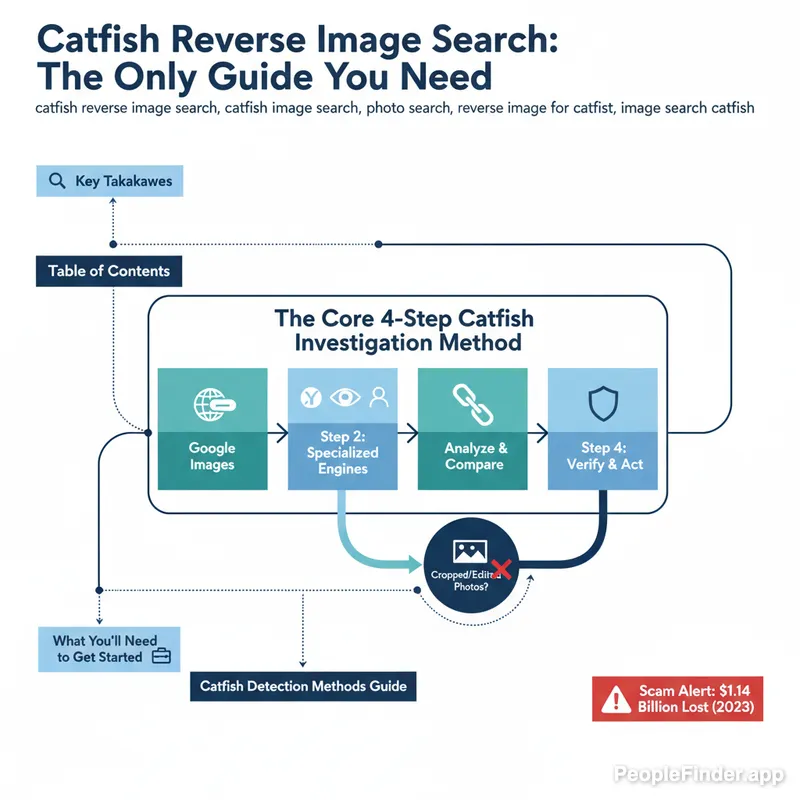
The Core 4-Step Catfish Investigation Method
I've found that the biggest mistake people make is running one search, not finding anything, and giving up. A proper catfish reverse image search isn't a single action; it's a methodical process. Follow these four steps in order for the best chance at uncovering the truth.
Step 1: The Broad Sweep with Google Images
Think of this as casting a wide net. Google is the biggest index, so it's good for catching lazy scammers who use photos from public websites, news articles, or blogs. It's fast and easy.
- Navigate to images.google.com.
- Click the camera icon ("Search by image").
- Upload the photo file from your computer or paste the image's URL.
What to look for: Look for exact matches of the image on other websites. Does it appear on a stock photo site? A random person's blog from 10 years ago? The social media profile of someone with a completely different name? Any of these are massive red flags.
Contrarian Insight: Google is often the least effective tool for a serious image search catfish investigation. Its algorithm is designed to find visually similar images, not just exact duplicates, which can create a lot of noise. More importantly, it heavily favors recent and popular results, often missing older origins of a photo.
Pro Tip: After you search, try adding keywords to the search bar like the person's supposed name or location (e.g., "John Smith" or "Chicago"). This can help filter the results and connect the photo to a specific identity, real or fake.
Step 2: The Deep Dive with Specialized Engines
Now we bring in the specialists. These tools have different strengths and often find what Google misses. You should run the same photo through all of them.
- TinEye: This is the time machine. TinEye's primary function is to find out where an image appeared first. It sorts results by date, which is incredibly useful for discovering if a "recent" photo was actually posted on a blog in 2012. It's less cluttered than Google, focusing on exact and slightly modified matches.
- Yandex: The facial recognition powerhouse. In my experience testing these tools, Yandex is exceptionally good at finding other photos of the same person, even if they are wearing different clothes or are at a different angle. It seems to have a stronger index of international and social media sites, especially from Eastern Europe.
- PeopleFinder.app: The profile aggregator. While the others find instances of an image across the web, PeopleFinder is designed to connect an image to a person's complete digital footprint. Our specialized reverse image search technology doesn't just find the picture; it tries to link it to social media profiles, public records, and other identifying information, giving you context that a simple image match can't.
Step 3: The Social Media Cross-Reference
If your catfish photo search from Step 2 returned a name, your work isn't done. Now you must verify it. Search the name you found on major social platforms: Facebook, Instagram, LinkedIn, X (formerly Twitter).
- Does the profile you find match the story you were told?
- Look at the age of the account. A brand-new profile with few friends and minimal activity is a classic catfish sign.
- Examine tagged photos. Catfish profiles rarely have photos of them tagged by other real people. Are all their photos solo selfies?
This is where you connect the dots between the photo and a real-life social graph. A genuine person usually has a messy, years-long history of interactions. A catfish's profile often feels like a sterile, recently constructed movie set.
Step 4: Analyze the "No Results" Scenario
What if you search everywhere and find nothing? Don't automatically assume the person is real. This is my second contrarian take: finding absolutely no results can be a bigger red flag than finding a match.
Most people who have been online for any length of time have some kind of digital footprint—a photo on a company website, a tagged picture from a friend's wedding, a profile on a niche forum. A complete blank slate could mean:
- The photos are from a private, un-indexed social media account.
- The scammer is using very new or obscure photos that haven't been indexed yet.
- The person genuinely has no online presence (rare, but possible).
- The photos are AI-generated (more on this below).
If you get no results, it's time to rely on other behavioral red flags. Are they pushing to move the conversation off the dating app immediately? Do they avoid video calls? Do they have a dramatic story that soon involves needing money?
Choosing the Right Tool: A Head-to-Head Comparison
To help you decide where to focus your efforts, here’s a breakdown of the primary tools for a reverse image for catfish operation.
| Tool | Best For | Key Feature | Potential Blind Spot |
|---|---|---|---|
| Google Images | Quickly finding photos on public websites, blogs, and news articles. | Massive index and "visually similar" image suggestions. | Can be noisy; often misses origins on social media. |
| TinEye | Finding the oldest version of an image to see its origin. | Sorts results by date, showing when an image first appeared online. | Smaller index than Google; may miss more recent uses. |
| Yandex Images | Finding other photos of the same person using facial recognition. | Excellent facial matching and indexing of international social sites. | User interface is less intuitive for English speakers. |
| PeopleFinder.app | Connecting a photo to a real person's full digital footprint. | Aggregates social profiles, public data, and contact info. | Designed for finding people, not just image duplicates. |
How to Uncover Modified or Cropped Photos
Smart scammers know that a basic catfish image search can expose them. That's why they often use modified photos—a slight crop, a color filter, or flipping the image horizontally. These simple changes can sometimes fool search algorithms.
Here’s how to fight back:
- Look for the Original: If you have a tightly cropped headshot, the original might be a group photo. Try using your browser's "Inspect" tool on the dating app's web version to see if you can find a URL for a higher-resolution or un-cropped version of the image.
- Flip It: Use any basic photo editor to flip the image horizontally and search again. It's a simple trick, but it can work.
- Search the Background: Ignore the person for a second. Is there a unique landmark, building, or sign in the background? Search for that. A search for "man in front of the Unisphere in Queens" might lead you to the original tourist's Flickr album where the photo was stolen.
Pro Tip: Pay attention to the image quality. If a photo looks grainy or pixelated, it's likely a screenshot of a screenshot—a classic sign it's been stolen and re-used multiple times. Ask for a clear, recent photo. If they refuse, that's your answer.
Spotting AI-Generated Fakes: The New Catfish Frontier
The latest threat isn't just stolen photos; it's photos of people who don't even exist. A 2024 study from University College London highlighted the increasing sophistication and danger of AI-driven disinformation. Catfish are using AI image generators to create unique, attractive "people" whose photos will never show up in a reverse image search.
But AI isn't perfect. Look for these tell-tale signs:
- Weird Hands: AI still struggles with hands. Look for extra fingers, unnatural bending, or strange proportions.
- Uncanny Valley Symmetry: Is the face perfectly, unnervingly symmetrical? Real faces have minor imperfections.
- Mismatched Details: Check earrings—AI often generates one style on one ear and a different one on the other. Look for bizarre details in clothing patterns or text in the background that looks like gibberish.
- Blurry Backgrounds: Often, the AI-generated person is in sharp focus, but the background is a nonsensical, blurry mess that doesn't look like a real place.
Troubleshooting Your Catfish Photo Search
Sometimes your search won't go as planned. Here are some common problems and how to solve them.
- Problem: "No results found."
Solution: As discussed, this is suspicious. It's time to stop focusing on the catfish photo search and start focusing on behavior. Insist on a live, unscripted video call. No excuses. If they refuse, you are almost certainly dealing with a catfish. - Problem: "I found the photos, but they're on dozens of profiles with different names."
Solution: You've found a "catfish pack." Scammers often use the same set of 10-20 photos of an attractive but anonymous person to create fake personas across the internet. The person in the photos is a victim, too. Your conclusion is clear: the person you're talking to is a scammer. Cease contact and report the profile. - Problem: "The image quality is too low for a good search."
Solution: Ask them to send you a higher-quality photo. Be specific: "Hey, that picture is a little blurry on my end, could you send me the original?" Their reaction will tell you everything. If they get defensive or make excuses, they likely don't have the original because they stole it.
Ultimately, a reverse image search is a powerful data-gathering tool. For a comprehensive check, you can use a dedicated people search engine to find more than just photos. A tool like PeopleFinder.app can help you verify names, locations, and other details they've given you, providing a more complete picture of who you're really talking to.
Frequently Asked Questions
What is the best free catfish reverse image search tool?
There is no single "best" tool. A combination of Google Images (for broad reach), TinEye (for image age), and Yandex (for facial recognition) provides the most comprehensive free search. Each has unique strengths that cover the others' weaknesses.
Can someone know if I do a reverse image search on their photo?
No, they cannot. Performing a reverse image search is completely anonymous. The person whose photo you are searching will not receive any notification or alert. It is a private investigative action on your part.
Does a catfish reverse image search work on screenshots?
Yes, it works on screenshots, but the quality can impact the results. A screenshot is a lower-quality version of the original image, which might make it harder for search engines to find an exact match. Always try to get the original photo file if possible.
What if the photos are from a private Instagram or Facebook profile?
Reverse image search engines generally cannot index photos from private profiles. If a scammer is using photos from a private account, they are unlikely to appear in your search results. This is a common tactic for more sophisticated catfish.
How can I be 100% sure someone is a catfish?
The only way to be 100% sure is to have a live, real-time video chat where you can see and talk to the person. If they consistently make excuses to avoid video calls, that is the most significant red flag. A reverse image search match is strong evidence, but the refusal to video chat is often the final confirmation.
Are there apps specifically for catfish reverse image search?
Yes, many people search and reverse image search apps are available. PeopleFinder.app offers a robust image search feature integrated with a comprehensive people search engine, allowing you to connect a photo not just to other websites, but to a person's entire online identity for more thorough verification.
What should I do after I confirm someone is a catfish?
Do not confront them or let them know you've figured it out. Simply cease all communication immediately, block their profile, and report them on the dating app or social media platform. If you have lost money, report it to the FTC and the FBI's IC3.
Find Anyone Online in Seconds
Upload a photo and our AI finds matching profiles across the entire internet.
Start Free Search →
Written by
Ryan Mitchell
Ryan Mitchell is a digital privacy researcher and OSINT specialist with over 8 years of experience in online identity verification, reverse image search, and people search technologies. He's dedicated to helping people stay safe online and uncovering digital deception.
Recent Posts
- Instagram Profile Search: A Complete Guide for 2026
Aug 4, 2026
- Snapchat Username Search: Find Profiles in 2026
Aug 3, 2026
- How Many Sherlock Face Search Apps Are There in 2026
Aug 2, 2026
- Sherlock AI Face Search Which One Is Real: A 2026 Guide
Aug 1, 2026
- Sherlock AI Face Search Reviews 2026: Better Options
Jul 31, 2026
You Might Also Like
- 9 Best Free Reverse Image Search Tools (2026 Updated)
Feb 24, 2026
- Free Reverse Image Search Tools That Actually Work
Feb 24, 2026
- How to Reverse Image Search on iPhone in 2026 (4 Methods)
Feb 23, 2026
- How to Reverse Image Search on Android: Step-by-Step
Feb 28, 2026
- How to Catch a Catfish: Complete Online Dating Safety Guide
Mar 13, 2026
Related Articles
9 Best Free Reverse Image Search Tools (2026 Updated)
Feb 24, 2026
Free Reverse Image Search Tools That Actually Work
Feb 24, 2026
How to Reverse Image Search on iPhone in 2026 (4 Methods)
Feb 23, 2026
How to Reverse Image Search on Android: Step-by-Step
Feb 28, 2026
How to Catch a Catfish: Complete Online Dating Safety Guide
Mar 13, 2026
Face Finder: 6 Best Tools to Identify Unknown Faces
Mar 2, 2026
8 Best People Search Engines in 2026 (By Photo & Name)
Mar 19, 2026
Face Recognition Search: How AI Identifies People by Photo
Feb 27, 2026
What Is Reverse Image Search? Simple Explanation + Tools
Mar 9, 2026
5 Red Flags of a Dating Scam: Protect Yourself Now
Feb 20, 2026
10 Best Reverse Image Search Engines in 2026
Feb 23, 2026
7 Ways to Reverse Image Search on iPhone Like a Pro
Feb 20, 2026
Find Person by Photo: 8 Free Methods That Actually Work
Feb 24, 2026
How to Reverse Image Search on iPhone in 2026 (4 Methods)
Feb 23, 2026
How Reverse Image Search Works: A Complete Beginner's Guide
Feb 22, 2026
PimEyes vs FaceCheck: Which Face Search Wins in 2026?
Feb 24, 2026
Reverse Image Search: The Ultimate Guide to Finding Anything Online 2026
Feb 22, 2026
Backwards Image Search: What It Is and How to Use It
Feb 24, 2026