What Is Reverse Image Search? Simple Explanation + Tools

A reverse image search explained in one sentence is a search engine technology that uses an image file—instead of a text keyword—as the query to find its origin, visually similar images, and related information across the web. You're essentially asking the internet, "Where did this picture come from and what else do you know about it?" It's a fundamental tool for digital literacy, helping you verify information, find sources, and protect your own digital identity. It goes far beyond a simple text search, opening up a whole new way to explore the visual side of the web.
For a deeper dive into how this works for identifying people, check out our complete guide to face search technology.
In Simple Terms
You give a search engine a picture, and it finds where that picture (or similar ones) appears online. It's like asking a librarian to find every book that contains a specific illustration you've torn out of a magazine.
How Does This "Image as a Query" Thing Actually Work?
So, you upload a photo. What happens next? It feels like magic, but it's just clever computer science. Most people think the engine is matching pixels one-for-one like a giant puzzle. That's a common misconception. The reality is much more sophisticated and is the core of our reverse image search explained methodology.
The process generally follows a simple framework I call the "C-M-R Method":
- Create (The Digital Fingerprint): When you upload an image, the search engine doesn't "see" it like a person. Instead, it analyzes the image and creates a unique mathematical signature, often called a "hash" or "digital fingerprint." This process, known as feature extraction, identifies key visual elements—like shapes, colors, textures, and prominent lines—and converts them into a string of numbers the computer can understand.
- Match (The Database Comparison): The search engine then takes this unique fingerprint and compares it against the billions of fingerprints from images it has already indexed from across the web. It's looking for exact matches, near-matches, and visually similar patterns.
- Return (The Results): Finally, the engine shows you all the places where it found a matching or similar fingerprint. This includes websites where the exact image appears, pages with visually similar photos, and sometimes even the different sizes and resolutions of your original image.
This method is why a reverse image search can find a photo even if it has been cropped, resized, or had a filter applied. The core "fingerprint" often remains recognizable enough for the algorithm to find a match.
Pro Tip: If you're looking for a specific object within a busy photo, crop the image to focus only on that object before you upload it. This gives the search engine a more precise "fingerprint" to work with, leading to much more accurate results.
Not All Reverse Image Searches Are Created Equal
The term "reverse image search" is a broad one. The right tool depends entirely on what you're trying to find. Using Google to identify a person's social media profile from a photo is like using a hammer to turn a screw—it might work, but it's not the right tool for the job. In my experience testing these tools, the biggest mistake people make is not matching the tool to the task.
Here's a breakdown of the main types:
| Tool Type | Best For | Key Feature | Major Limitation |
|---|---|---|---|
| General Search Engines (Google Images, Bing) | Finding image sources, similar stock photos, and general web context. | Massive, constantly updated index of the public web. | Poor at identifying specific, non-famous people due to privacy filters. |
| Specialized People Search (PeopleFinder.app, PimEyes) | Identifying individuals, finding social media profiles, and verifying identities. | Uses advanced facial recognition technology trained on human faces. | Often requires a subscription for full results; focused only on people. |
| Product/Object Search (Google Lens, Pinterest Lens) | Identifying products to buy, plants, animals, or landmarks. | Integrates with shopping platforms and knowledge graphs. | Not designed for finding sources or people; results are commercial or informational. |
If you're curious about your options, we've tested and ranked the 10 best reverse image search engines for various tasks.
So, What Can You Actually Do With It? (Real-World Uses)
Understanding the reverse image meaning is one thing; applying it is another. This isn't just a novelty. It's a practical tool with serious real-world applications.
- Verifying Online Identities & Catching Catfish: Is that person you met on a dating app who they say they are? A quick search can reveal if their photos are stolen from someone else's social media profile. This is more important than ever, as the FTC reported that consumers lost a staggering $1.14 billion to romance scams in 2023. A specialized tool like PeopleFinder.app is designed specifically for this purpose.
- Finding the Original Source of an Image: See a powerful photo on social media? A reverse search can help you find the original photographer or news article, giving you proper context and the ability to credit the creator. - Busting Misinformation: Fake news often uses old photos in new, misleading contexts. A 2024 Reuters Institute report found that 59% of people are concerned about identifying fake news online. A reverse search can quickly show you when and where an image was first used, debunking false claims.
- Protecting Your Own Content: Are you a photographer, artist, or creator? You can search for your own images to see if they're being used without your permission or without proper credit.
- Making Your Life Easier: On a lighter note, you can use it to identify a piece of furniture you like, find a recipe from a photo of a dish, or finally figure out what that strange-looking plant in your backyard is. Many users are also learning how to perform a reverse image search on Android for on-the-go identification.
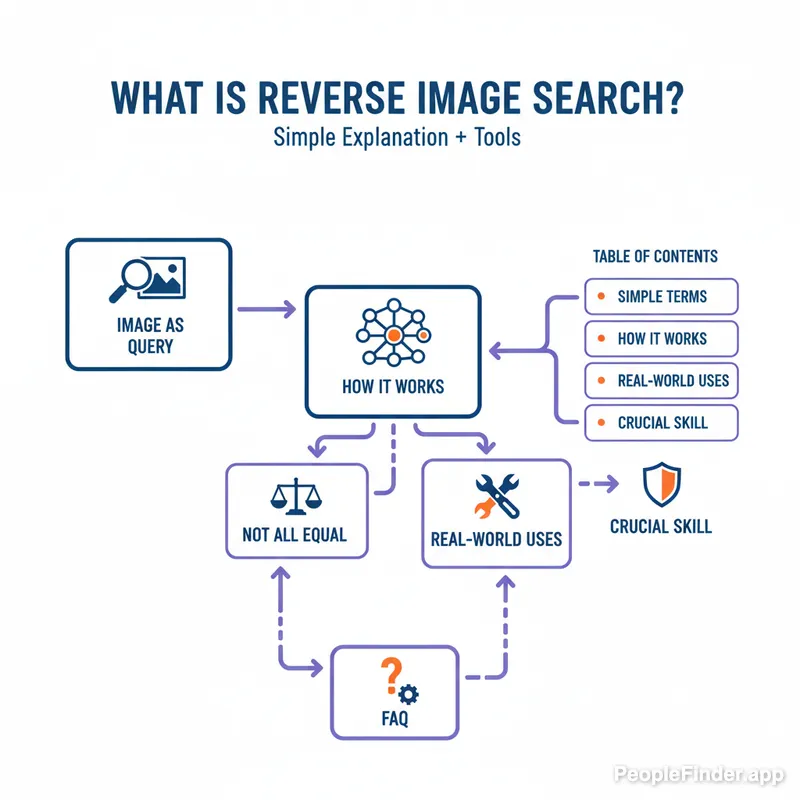
Why a Reverse Image Search Is a Crucial Digital Skill
The ability to perform a reverse image search is no longer a niche skill for techies. It’s a core component of digital literacy. In an era of AI-generated images and rampant online deception, being able to question and verify what you see is essential for staying safe and informed.
Here’s a contrarian take: People often focus on using these tools to find *other* people. But I've found the most powerful, and overlooked, use is managing your *own* digital footprint. A regular reverse search of your own photos can reveal where your images are being used without your permission, from old forum profiles you forgot about to websites that have scraped your social media content. It's a critical step in taking control of your online privacy.
Whether you're doing it from your desktop or figuring out the best way to reverse image search on an iPhone, it’s about empowering yourself with information. It gives you the ability to cut through the noise and find the ground truth in a visual world.
Ready to see how powerful a specialized search can be for verifying a profile or finding where a photo appears online? Try your first search on PeopleFinder.app today.
Related Terms:
Content-Based Image Retrieval (CBIR): This is the official computer science term for the process of searching for digital images in large databases based on their visual content (colors, shapes, textures), rather than metadata like keywords or tags.
Visual Search: A broader term that includes reverse image search but also encompasses technology where you can point your camera at an object in the real world to get information about it (like Google Lens).
Digital Fingerprinting: The process of creating a unique identifier (a "fingerprint" or "hash") for a piece of media, like an image, to make it easily searchable and comparable.
Frequently Asked Questions
What is the most basic reverse image search definition?
The simplest reverse image search definition is a search technique where you use an image as your search query to find matching or similar images online. Instead of typing words, you upload a picture to find out where it comes from and where else it exists on the web.
Is it free to perform a reverse image search?
Yes, many powerful reverse image search engines are free. Google Images, Bing Visual Search, and TinEye offer robust services at no cost. However, specialized services, particularly those for facial recognition or advanced tracking, often operate on a subscription model. We have a list of the best free reverse image search tools if you're looking for options.
Can you reverse image search a person to find their identity?
Yes, you can, but it requires a specialized tool. General search engines like Google are intentionally poor at this to protect privacy. Platforms like PeopleFinder.app use advanced facial recognition technology specifically designed to match a photo of a person to public online profiles and other appearances.
Does a reverse search show who took the picture?
Not directly. A reverse image search can't access private file data to identify the original photographer. However, it can lead you to the website or social media profile where the image was first published, which often includes attribution or information about the creator in the metadata or caption.
What is the most accurate reverse image search engine?
Accuracy depends on your goal. For finding the source of a generic image, TinEye is often considered highly accurate as it focuses on exact matches. For identifying products or landmarks, Google Lens is superior. For identifying people, a dedicated face-search guide will show that specialized facial recognition engines are unmatched.
Is it legal to reverse image search someone's photo?
Yes, it is generally legal to use a publicly available photo to perform a reverse image search. The act of searching is not illegal. However, how you use the information you find could have legal implications. Using the information for harassment, stalking, or copyright infringement is illegal, as outlined by laws like the Communications Decency Act (CDA) Section 230 and various state-level privacy laws.
Can a reverse image search find every copy of a picture?
No, it can't. A reverse image search can only find images that have been indexed by the search engine. It cannot find images on private websites, password-protected social media accounts, in private emails, or on pages that have specifically blocked search engine crawlers. The results are extensive but not exhaustive.
Find Anyone Online in Seconds
Upload a photo and our AI finds matching profiles across the entire internet.
Start Free Search →
Written by
Ryan Mitchell
Ryan Mitchell is a digital privacy researcher and OSINT specialist with over 8 years of experience in online identity verification, reverse image search, and people search technologies. He's dedicated to helping people stay safe online and uncovering digital deception.
Recent Posts
- Social Catfish Alternatives That Actually Work in 2026
Sep 11, 2026
- Deleting Search History Made Easy and Private
Sep 8, 2026
- Image Similarity Search: How It Works and Why It Matters
Sep 4, 2026
- Online Reputation Monitoring: The 2026 Guide
Sep 1, 2026
- AI Face Search: How It Works and What to Know
Aug 28, 2026
You Might Also Like
- 9 Best Free Reverse Image Search Tools (2026 Updated)
Feb 24, 2026
- Free Reverse Image Search Tools That Actually Work
Feb 24, 2026
- Find Person by Photo: 8 Methods, Free Options and Limits
Feb 24, 2026
- How to Reverse Image Search on iPhone in 2026 (4 Methods)
Feb 23, 2026
- PimEyes vs FaceCheck: Which Face Search Wins in 2026?
Feb 24, 2026
Related Articles
9 Best Free Reverse Image Search Tools (2026 Updated)
Feb 24, 2026
Free Reverse Image Search Tools That Actually Work
Feb 24, 2026
Find Person by Photo: 8 Methods, Free Options and Limits
Feb 24, 2026
How to Reverse Image Search on iPhone in 2026 (4 Methods)
Feb 23, 2026
PimEyes vs FaceCheck: Which Face Search Wins in 2026?
Feb 24, 2026
Face Finder: 6 Best Tools to Identify Unknown Faces
Mar 2, 2026
Face Recognition Search: How AI Identifies People by Photo
Feb 27, 2026
10 Best Reverse Image Search Engines in 2026
Feb 23, 2026
7 Ways to Reverse Image Search on iPhone Like a Pro
Feb 20, 2026
How Reverse Image Search Works: A Complete Beginner's Guide
Feb 22, 2026
Stolen Photos Online? Find Them With Reverse Image Search
Feb 20, 2026
Reverse Image Search: The Ultimate Guide to Finding Anything Online 2026
Feb 22, 2026