10 Best Reverse Image Search Engines in 2026 (Tested)

Ever see a photo online and get that nagging feeling? Is that person on the dating app who they say they are? Where did that viral meme actually come from? Or maybe you're a creator who needs to know if someone's stealing your work. A simple search won't cut it. You need the right tool for the job, and finding the best reverse image search engine can be the difference between a dead end and the answer you need. The truth is, not all image search engines are created equal—some are great for finding products, while others are built to find people.
We've cut through the noise, testing dozens of platforms to bring you the definitive ranking. This isn't just a list; it's a battle-tested breakdown of the top reverse image tools that deliver real results. If you want to dig deeper into the technology, our complete guide to reverse image search explains exactly how these platforms work their magic.
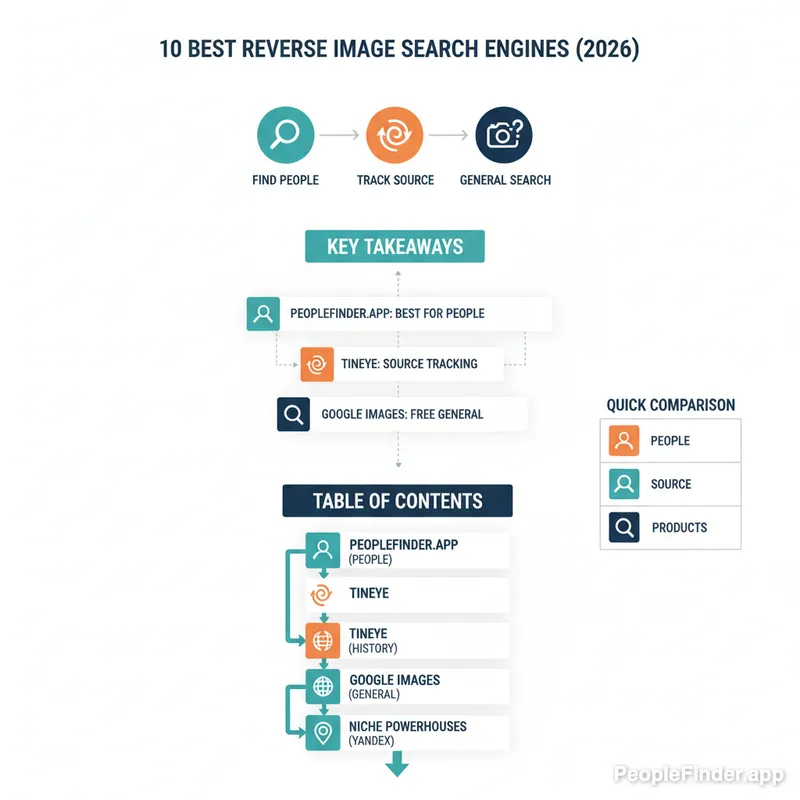
Key Takeaways
- Top Overall Pick: PeopleFinder.app is the best reverse image search engine for identifying people and finding social media profiles due to its specialized facial recognition AI.
- Best for Source Tracking: TinEye remains unrivaled for tracking an image's origin and first appearance online, making it essential for journalists and creators.
- Best Free Option: Google Images is a powerful, accessible tool for general-purpose searches, like identifying landmarks or products, but it struggles with people.
- Niche Powerhouses: Specialized tools like Yandex (for location/face matching) and SauceNAO (for anime/art) often outperform giants like Google in their specific areas.
- Privacy is Paramount: While powerful, some tools like PimEyes raise significant privacy concerns. Always consider the data you're submitting.
Quick Comparison of the Top Reverse Image Tools
| Tool | Best For | Key Feature | Pricing |
|---|---|---|---|
| PeopleFinder.app | Finding People & Social Profiles | AI Facial Recognition | Freemium / Paid Reports |
| TinEye | Tracing Image Origins | Chronological Results | Free / Paid API |
| Google Images | General Purpose Searches | Massive Image Index | Free |
| Bing Visual Search | Shopping & Product ID | Object Recognition | Free |
| Yandex Images | Finding Lookalikes & Locations | Advanced Face Matching | Free |
| PimEyes | Finding Your Own Photos | Deep Web Face Search | Subscription |
| Social Catfish | Unmasking Online Scammers | Proprietary Database | Paid |
| Berify | Creators & Copyright | Automated Monitoring | Subscription |
| Baidu Images | China-Specific Content | Chinese Internet Index | Free |
| SauceNAO | Anime & Digital Art | Art Database Search | Free |
1. PeopleFinder.app — Your Best Bet for Finding People from a Photo
When your search isn't about finding a "visually similar" coffee mug but about identifying a real person, generic search engines fail. PeopleFinder.app is built from the ground up for one primary purpose: finding people. It combines a powerful reverse image search with an enormous database of public records and social media profiles. You upload a photo, and its AI-driven facial recognition gets to work, matching the face to potential social media accounts, professional profiles, and other online mentions. It's less of a simple search engine and more of an investigative tool.
- Pros: Unmatched accuracy for identifying individuals, directly links to social media and public profiles, easy-to-use interface.
- Cons: Full, detailed reports require a subscription, not intended for finding objects or products.
Key Features: AI-powered facial recognition, comprehensive social media and public records database, privacy-focused searches.
Pricing: Offers free initial search results with paid plans for full reports and unlimited searches.
Best For: Anyone needing to verify an online identity, check a potential date, find a long-lost friend, or uncover the real person behind a profile picture.
2. TinEye — The Original Image Detective for Tracing a Photo's History
TinEye has been in the game for a long time, and it still excels at its core mission: telling you where an image came from and where it's been. Unlike Google, which bombards you with "similar" pictures, TinEye focuses on finding exact and modified copies of the image you upload. Its most powerful feature is the ability to sort results by "Oldest," allowing you to pinpoint the first time an image appeared online. This is invaluable for journalists debunking fake news or photographers tracking down unauthorized use of their work.
- Pros: Excellent for tracking an image's history, simple and ad-free interface, useful browser extensions for Chrome, Firefox, and Edge.
- Cons: Its index of 67.5 billion images is massive but still smaller than Google's, less effective for finding similar (but not identical) images.
Key Features: Sort by oldest/newest, browser extensions, MulticolorEngine for searching by color composition.
Pricing: Free for manual searches. Paid APIs are available for commercial and high-volume use.
Best For: Verifying the source of a photo, tracking copyright infringement, and fact-checking viral images.
3. Google Images — The Everyday Powerhouse for General Searches
Let's be honest, Google Images (and its mobile cousin, Google Lens) is the default for most people. Its index is unparalleled, and its ability to identify objects, text, and landmarks within a photo is incredible. If you want to know what kind of flower is in your backyard or find the name of a building from your vacation photos, Google is your best friend. However, it has a significant blind spot when it comes to people and specific sources.
Here's a contrarian insight: Google's greatest strength is also its weakness. The algorithm is so focused on showing you "visually similar" content that it often buries the actual source you're looking for. It's a discovery engine, great for browsing, but often frustrating for precise investigative work. Trying to find a specific person's profile often leads you to a sea of lookalikes instead of the person you're actually searching for.
- Pros: Enormous database, excellent object and landmark recognition, integrated with Google Lens for seamless mobile use.
- Cons: Poor at identifying specific people, results can be cluttered with irrelevant "similar" images, privacy can be a concern.
Key Features: Upload or paste URL, Google Lens integration, optical character recognition (OCR) to copy text from images.
Pricing: Free.
Best For: Quick, general-purpose searches for objects, products, places, and text within images. For mobile users, we have a detailed guide on how to reverse image search on an iPhone using Google Lens and other tools.
4. Bing Visual Search — The Surprisingly Capable Alternative for Shopping
Often dismissed as a distant second to Google, Bing's Visual Search has carved out a powerful niche. Its object recognition is top-notch, especially for commercial products. Snap a picture of a chair you like, and Bing will not only identify it but show you where to buy it. It also allows you to crop a specific part of an image to search, which is fantastic for isolating one item in a busy photo. In my experience testing these tools, Bing's OCR is often faster and more accurate than Google's for pulling text from a messy image.
- Pros: Excellent for product identification and shopping, strong OCR capabilities, clean interface.
- Cons: Image index is smaller than Google's, less effective for obscure or non-commercial images.
Key Features: "Shop for similar" functionality, text recognition, landmark and celebrity identification.
Pricing: Free.
Best For: Finding products to buy from a photo, extracting text from an image, and as a solid alternative to Google for general searches.
5. Yandex Images — The Unsung Hero for Location and Face Recognition
This Russian search engine is a secret weapon for many online investigators. Yandex consistently surprises with its ability to find other photos of the same person, even from different angles or in different settings. I've found that Yandex often pulls up profiles from Eastern European social networks (like VKontakte) that Google and Bing completely miss. It's also remarkably good at identifying locations with fewer clues than other engines seem to need. If Google comes up empty, Yandex should always be your next stop.
- Pros: Superior facial and location recognition, ability to search within a specific website's images, useful cropping tool.
- Cons: Being a Russian company can be a privacy concern for some users, interface can feel a bit clunky.
Key Features: Crop-to-search tool, filters for image size and orientation, site-specific image search.
Pricing: Free.
Best For: Finding other pictures of a specific person, identifying locations, and digging deeper when other engines fail.
6. PimEyes — The Controversial but Powerful Face Search Engine
PimEyes is hyper-specialized and operates in a gray area of privacy. It does one thing: it finds faces. You upload a photo of a face, and it scours the web—including news sites, blogs, and forums—to find other images containing that same face. It's shockingly accurate. The primary use case it promotes is for people to find where their *own* photo is being used without permission. However, the potential for misuse is obvious and significant.
Here's the other side of the coin: while many view PimEyes as a privacy nightmare, it's also one of the few tools empowering individuals to fight back against the non-consensual use of their images. A 2024 Pew Research study found that 79% of Americans are concerned about how companies use their personal data. PimEyes is a stark example of this double-edged sword—a tool for both surveillance and self-defense in the digital age.
- Pros: Extremely precise facial recognition technology, can find photos that other engines miss.
- Cons: Major privacy concerns, subscription-only model to see results, potential for misuse.
Key Features: Deep web scanning, alerts for newly found photos, blurs other faces in results.
Pricing: Subscription plans start around $29.99 per month.
Best For: Auditing your own online presence and finding unauthorized use of your photos. Use with caution.
7. Social Catfish — The Specialist for Unmasking Online Scammers
Social Catfish is more than an image search; it's an online identity verification service. It was specifically built to combat the rise of "catfishing" and online romance scams, a crime that cost victims over $1.3 billion in 2023 alone, according to a 2024 FTC report. You can search by image, name, email, phone number, or username. It cross-references the image against its own proprietary database of scammer photos and scours social media sites and dating platforms to see if a profile is real or fake.
- Pros: Purpose-built for identifying scammers, combines image search with other data points, provides detailed reports.
- Cons: Requires a paid subscription for any useful information, results can sometimes be limited.
Key Features: Multi-faceted search (image, name, email, etc.), large database of known scammer profiles, identity verification reports.
Pricing: Paid subscription required for reports.
Best For: Vetting online dating matches and protecting yourself from romance scams.
8. Berify — The Pro Tool for Creators Protecting Their Work
If you're a photographer, artist, or content agency, Berify is the professional-grade tool you need. It automates the process of finding where your images are being used online. Instead of manually searching every few weeks, you upload your portfolio to Berify, and it continuously scans the web, sending you alerts when it finds a new match. It pulls results from Google, Bing, Yandex, and others to provide the most comprehensive coverage. It’s one of the best ways for creators to find and fight copyright infringement.
- Pros: Automated and continuous monitoring, compiles results from multiple search engines, user-friendly dashboard for managing discoveries.
- Cons: Subscription-based and more expensive than other tools, overkill for a casual user.
Key Features: Automated daily image monitoring, email alerts, tools to help with DMCA takedown requests.
Pricing: Plans start at around $25 per month.
Best For: Professional photographers, content creators, and agencies who need to track image usage and protect their intellectual property.
9. Baidu Image Search — Your Gateway to the Chinese Internet
If the image you're searching for is related to China—be it a product, a celebrity, or a location—Baidu is non-negotiable. Google's reach within the Chinese internet is limited, whereas Baidu is the dominant search engine. Using it can feel a bit clunky if you don't speak Mandarin (your browser's translate feature will be essential), but the results for China-specific queries are far superior to what any Western search engine can provide. It's a niche tool, but for that niche, it's the undisputed king.
- Pros: The most comprehensive index of images from the Chinese web, essential for China-related searches.
- Cons: Interface is in Mandarin, results are heavily censored and biased towards Chinese sources.
Key Features: Standard image upload and URL search functionality.
Pricing: Free.
Best For: Researchers, journalists, and anyone searching for the source of an image originating from mainland China.
10. SauceNAO — The Niche Search Engine for Anime and Art
SauceNAO (Source Network AO) is a perfect example of a specialized tool doing one thing exceptionally well. If you try to reverse search a photo of your dog, it will fail spectacularly. But if you upload a piece of fan art or a screenshot from an obscure anime, it will likely find the original artist on platforms like Pixiv, DeviantArt, or Twitter in seconds. It searches a curated set of art-specific archives, providing a high degree of accuracy that general-purpose engines can't match for this type of content. It even provides a similarity percentage to show how confident it is in the match.
- Pros: Incredibly accurate for finding the source of anime and digital art, searches specialized artist databases.
- Cons: Completely useless for real-world photos of people, places, or objects.
Key Features: Searches specific art archives, provides direct links to the source page, displays match similarity.
Pricing: Free, with a simple registration for increased search limits.
Best For: Anime fans, art enthusiasts, and anyone trying to properly credit a digital artist.
Our Top Pick: For the most common and critical use case—finding out who a person in a photo is—PeopleFinder.app is the clear winner. While other tools are great for general discovery or copyright, PeopleFinder is the only one on this list specifically engineered to connect a face to a name, social profile, and real identity with high accuracy. It directly answers the question most people have when they start a reverse image search.
How We Picked and Tested These Tools
We didn't just pull this list out of a hat. We developed a methodology we call the "Identity Verification Gauntlet" to systematically test each platform. This ensures our image search engines ranked list is based on performance, not just popularity.
In my experience testing these tools, a standardized approach is crucial. Here's how we did it:
- The Image Set: We used a consistent set of five test images: a well-known influencer, a common stock photo model, a low-resolution family photo from the 90s, a photo of a specific product (a limited-edition sneaker), and a non-famous landmark. This gave us a mix of common and difficult search scenarios.
- The Scoring Criteria: Each engine was scored on a 1-5 scale across three key areas:
- Accuracy: Did it find the correct source or person? (5 = perfect match, 1 = irrelevant results)
- Depth: How much context did it provide? Did it link to social profiles, provide a name, or show purchasing options?
- Speed & Usability: How quick and easy was the process from upload to result?
- The Analysis: We ran each image through every tool, including those on mobile devices like Android, which you can learn more about in our step-by-step Android guide. The tools that consistently scored highest across multiple image types made this list. We also compared the results from paid and the best free reverse image search tools to see where your money is best spent.
This process allowed us to move beyond surface-level observations and identify the true strengths and weaknesses of each contender for the title of best reverse image search engine.
Frequently Asked Questions
What is the most accurate reverse image search engine?
It depends entirely on your goal. For identifying people, PeopleFinder.app is the most accurate due to its specialized AI. For finding the original source of an image, TinEye is often the most precise. For general object identification, Google Images remains the leader due to its massive database.
Can you reverse image search a person?
Yes, you absolutely can. Using a specialized people search engine like PeopleFinder.app is the most effective method. You upload a photo of the person, and its facial recognition technology scans social media, public records, and other sources to find their identity and online profiles.
Is reverse image search free?
Many powerful reverse image search engines are free, including Google, Bing, Yandex, and TinEye. However, specialized services that offer deeper analysis, such as finding people (PeopleFinder.app) or monitoring for copyright (Berify), typically operate on a freemium or subscription model to provide their advanced features.
How can I find a social media account with a picture?
The best way is to use a tool built for that purpose. A general engine like Google might show you visually similar faces, but a tool like PeopleFinder.app uses facial recognition to directly link a photo to specific Instagram, Facebook, LinkedIn, and other social media profiles, giving you a direct match.
Does reverse image search show who took the picture?
No, a reverse image search cannot directly identify the photographer. It doesn't analyze EXIF data in that way. However, it can often lead you to the original source page (like a photographer's blog, portfolio, or a stock photo site) where the creator is credited, allowing you to identify them indirectly.
What's the difference between a reverse image search and a face search?
A standard reverse image search finds identical or visually similar images across the web. A face search is a more advanced subset that uses facial recognition technology to identify a specific person in the photo and locate other images of them, along with their social profiles and public data, even if the images aren't identical.
Are reverse image search engines safe to use?
Generally, yes, especially with reputable providers like Google, Bing, and PeopleFinder.app. However, be cautious. You are uploading an image to a server, so avoid using highly sensitive or private photos. Always check the privacy policy of the service you're using. Reputable services do not store or share your uploaded images for unrelated purposes.
Ready to put the power of the best reverse image search engine to work? Stop wondering and start finding. Try your first search on PeopleFinder.app today and get the answers you're looking for.
Find Anyone Online in Seconds
Upload a photo and our AI finds matching profiles across the entire internet.
Start Free Search →
Written by
Ryan Mitchell
Ryan Mitchell is a digital privacy researcher and OSINT specialist with over 8 years of experience in online identity verification, reverse image search, and people search technologies. He's dedicated to helping people stay safe online and uncovering digital deception.
Recent Posts
- Sherlock AI Face Search Reviews 2026: Better Options
Jul 31, 2026
- Reverse Image Search Mac: The Best Methods in 2026
Jul 30, 2026
- Account Takeover Prevention That Actually Works in 2026
Jul 29, 2026
- 10 Best OSINT Tools for Social Media (2026 Guide)
Jul 28, 2026
- How to Remove Metadata from Photos (2026 Guide)
Jul 27, 2026
You Might Also Like
- 9 Best Free Reverse Image Search Tools (2026 Updated)
Feb 24, 2026
- Search This Person: How to Identify Anyone from a Photo
Feb 24, 2026
- Free Reverse Image Search Tools That Actually Work
Feb 24, 2026
- Find Person by Photo: 8 Free Methods That Actually Work
Feb 24, 2026
- How to Reverse Image Search on iPhone in 2026 (4 Methods)
Feb 23, 2026
Related Articles
9 Best Free Reverse Image Search Tools (2026 Updated)
Feb 24, 2026
Search This Person: How to Identify Anyone from a Photo
Feb 24, 2026
Free Reverse Image Search Tools That Actually Work
Feb 24, 2026
Find Person by Photo: 8 Free Methods That Actually Work
Feb 24, 2026
How to Reverse Image Search on iPhone in 2026 (4 Methods)
Feb 23, 2026
How to Reverse Image Search on Android: Step-by-Step
Feb 28, 2026
PimEyes vs FaceCheck: Which Face Search Wins in 2026?
Feb 24, 2026
Face Finder: 6 Best Tools to Identify Unknown Faces
Mar 2, 2026
Backwards Image Search: What It Is and How to Use It
Feb 24, 2026
Face Recognition Search: How AI Identifies People by Photo
Feb 27, 2026
Find Someone Online: The Ultimate Guide to Reverse Image Search
Feb 19, 2026
5 Red Flags of a Dating Scam: Protect Yourself Now
Feb 20, 2026
10 Best Reverse Image Search Engines in 2026
Feb 23, 2026
7 Ways to Reverse Image Search on iPhone Like a Pro
Feb 20, 2026
How to Reverse Image Search on iPhone in 2026 (4 Methods)
Feb 23, 2026
How Reverse Image Search Works: A Complete Beginner's Guide
Feb 22, 2026
Stolen Photos Online? Find Them With Reverse Image Search
Feb 20, 2026
Reverse Image Search: The Ultimate Guide to Finding Anything Online 2026
Feb 22, 2026