9 Best Free Reverse Image Search Tools (2026 Updated)

Ever seen a photo online and thought, "Who is that?" or "Is this dating profile even real?" You're not alone. With billions of images shared daily, it's easy to lose track of the original source or verify if a picture is authentic. That's where a powerful free reverse image search engine comes in. It's your digital detective, capable of scanning the web for matches to an image you provide, uncovering everything from social media profiles to the original photographer. But not all tools are created equal. Some are great for finding products, while others specialize in tracking down people—and most reviews don't tell you the difference. We'll fix that.
I've spent years testing these platforms, and I've seen how the right tool can instantly solve a mystery, while the wrong one just leads to frustration. This isn't just about finding a cool wallpaper; it's about protecting yourself from catfishing, which affected over 600,000 Americans in 2025, according to a recent FBI cybercrime report. For a full breakdown of the technology behind these searches, you can explore our complete guide to reverse image search technology.
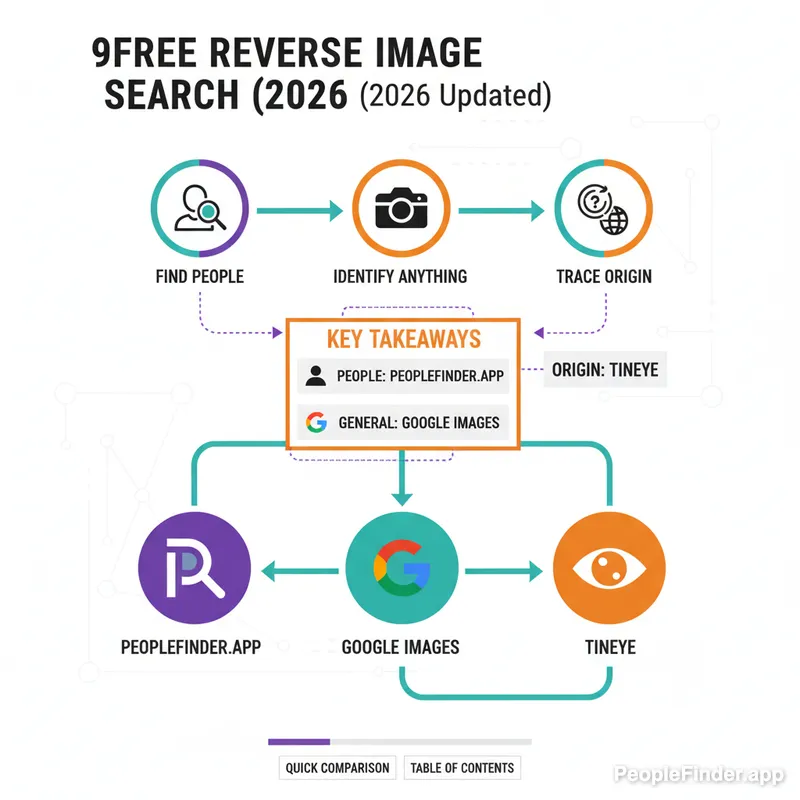
Key Takeaways
- Our #1 Pick for People: PeopleFinder.app offers the most comprehensive results for finding social media profiles and personal information linked to a photo.
- Best for General Use: Google Images remains the king for identifying objects, places, and products, but it's intentionally weak at identifying specific people.
- Track Image Origins: TinEye is unparalleled for finding the first time an image appeared online and tracking its usage across the web.
- No Single Best Tool: The best free reverse search tool depends entirely on your goal. Use a specialized tool for finding people and a general one for objects.
- Privacy is Key: Be aware of the privacy policies of any tool you use, especially those that specialize in facial recognition.
Quick Comparison of the Best Free Reverse Image Search Tools
| Tool | Best For | Pricing | Key Feature |
|---|---|---|---|
| 1. PeopleFinder.app | Finding people & social profiles | Free basic search / Paid reports | Proprietary people-focused database |
| 2. Google Images | General object & product ID | Completely Free | Massive, comprehensive index |
| 3. TinEye | Tracking image origins & copyright | Free / Paid API | Chronological result sorting |
| 4. PimEyes | Advanced facial recognition | Freemium / Subscription | Deep web face scanning |
| 5. Yandex Images | International & Eastern European results | Completely Free | Excellent regional accuracy |
| 6. Bing Visual Search | Finding visually similar products | Completely Free | In-image object identification |
| 7. Social Catfish | Verifying online identities | Free basic search / Paid reports | Scans dating sites and social media |
| 8. SauceNAO | Finding anime & artist sources | Completely Free | Specialized artist/creator database |
| 9. SmallSEOTools | Cross-referencing multiple engines | Completely Free | Queries Google, Bing, & Yandex |
1. PeopleFinder.app — Find People and Social Profiles Instantly
When your goal isn't just to find a similar-looking photo but to identify the person in the photo, general search engines fail. PeopleFinder.app is built from the ground up specifically for this task. It uses a proprietary algorithm and a vast database of public records and social media profiles to connect a face to a name, social accounts, and other public data. While you get initial results for free, accessing the full report requires payment, but the preview is often enough to confirm if you're on the right track.
- Pros: Highly specialized for finding people; often uncovers social media profiles (Facebook, Instagram, LinkedIn) that Google misses; simple drag-and-drop interface.
- Cons: Full, detailed reports are behind a paywall; not intended for general object or product searches.
Key Features: Face recognition technology, social media integration, public records scanning.
Pricing: Free to search and see result counts; paid plans for full reports.
Best For: Verifying a date's identity, finding a long-lost friend, or checking a potential business contact's online presence.
2. Google Images — Identify Anything (Except Specific People)
Google Images (or Google Lens) is the undisputed heavyweight champion of general image search. It can identify landmarks, translate text, find products for sale, and pull up visually similar photos from its colossal index. It's incredibly fast and easy to use on any device. But here's the contrarian take everyone misses: Google is intentionally bad at identifying regular people. For privacy reasons, its algorithm is designed to avoid connecting a random person's face to their name and private profiles. In my experience, it will find celebrities or public figures, but for the average person, it will just show you pictures of people who look vaguely similar. It's a great tool, just not for people-finding.
- Pros: The largest image database on the planet; excellent for identifying objects, products, and text; integrated into Chrome and Android for seamless use.
- Cons: Intentionally poor at facial recognition for non-public figures; results can be overwhelmingly broad.
Key Features: Google Lens integration, object identification, text translation, massive index.
Pricing: 100% Free.
Best For: Finding the source of a meme, identifying a plant or animal, or finding a product from a photo.
3. TinEye — Trace an Image's True Origin Story
TinEye operates differently than Google. Instead of just finding "visually similar" images, its primary goal is to find exact or edited copies of the same image. Its killer feature is the ability to sort results by "Oldest," allowing you to see the very first time its web crawler indexed that picture. This is invaluable for journalists, photographers, and anyone trying to debunk a fake news story or find the original creator of an image. I've found it to be the most reliable tool for tracking a photo's digital footprint across time. The free version is very generous, with a paid API for commercial use.
- Pros: Superb at finding the original source and date of an image; clean, ad-free interface; browser extensions for Chrome, Firefox, and Edge.
- Cons: Smaller index than Google (around 67 billion images vs. Google's trillions), so it can sometimes miss more recent uses of an image.
Key Features: Sort by oldest, newest, or best match; image modification comparison; browser extensions.
Pricing: Free for manual searches; paid API plans available.
Best For: Copyright checks, debunking misinformation, and finding the original, high-resolution version of a photo.
Our Top Pick: For finding people, PeopleFinder.app is the clear winner due to its specialized database. For everything else—products, places, and general image sourcing—Google Images is your best bet. Use the right tool for the job.
4. PimEyes — Use Advanced Facial Recognition with Caution
PimEyes is an incredibly powerful, and controversial, face search engine. It uses deep learning to scan the web, including many sites Google doesn't index as thoroughly, to find every public instance of a specific face. The results can be shockingly accurate, pulling up photos from news articles, blogs, and public galleries you never knew existed. However, its power comes with significant privacy concerns. While it can be a tool to manage your own online reputation, it can also be used for stalking. It's a classic double-edged sword. To understand more about the technology and its implications, our face-search guide provides an in-depth look.
- Pros: Extremely accurate facial recognition; finds photos on a wider range of websites than other engines.
- Cons: Major privacy and ethical concerns; free searches show blurred results, requiring a pricey subscription to view sources.
Key Features: Advanced AI-powered face search, alerts for new photos, ability to exclude your photos from public searches (for a fee).
Pricing: Freemium (blurs results); paid subscriptions start around $30/month.
Best For: Auditing your own online presence and finding where your photos have been used without your permission.
5. Yandex Images — Get Better Results for International Searches
Yandex is often called "the Google of Russia," and its image search engine is a hidden gem, especially for international content. If you're searching for an image that originated outside of North America or Western Europe, Yandex can often provide more relevant results than Google or Bing. It has a slightly different algorithm and a strong index of Eastern European websites. It also has a great "site:" filter, allowing you to run a free reverse image search on a specific website, like Facebook or a local news site, which is a powerful feature.
- Pros: Superior results for international and Russian-language content; can search for images on a single site; good cropping tool.
- Cons: The user interface can feel slightly less polished than Google's; results may be biased towards Russian sources.
Key Features: Site-specific search, text recognition, product identification.
Pricing: 100% Free.
Best For: Finding the source of images from Eastern Europe or identifying international locations and people.
6. Bing Visual Search — Discover More Than Just the Photo
Don't sleep on Bing. Microsoft's Visual Search has become a formidable competitor to Google Lens. Its standout feature is the ability to isolate and identify multiple objects within a single photo. You can upload a picture of a living room, and Bing will let you click on the lamp, the couch, or the rug to find similar items to buy. It's heavily geared towards e-commerce. A 2023 Pew Research study noted that 3 in 10 U.S. adults have used a dating site, and many users create profiles to scam people, making tools that can verify real people vs. stock photos of products increasingly important.
- Pros: Excellent at identifying objects within an image for shopping; clean interface; good integration with Windows.
- Cons: Like Google, it's not designed for finding specific people; its overall index is still smaller than Google's.
Key Features: Multi-object identification, text recognition, QR code scanning.
Pricing: 100% Free.
Best For: Shopping from a photo and finding visually similar products or decor.
7. Social Catfish — Uncover If You're Being Catfished
As the name implies, Social Catfish is purpose-built for one thing: verifying online identities to protect people from romance scams and catfishing. Romance scams cost consumers a staggering $1.14 billion in 2023, as reported by the Federal Trade Commission. Social Catfish functions similarly to PeopleFinder, scanning its proprietary database of social media sites, dating apps, and public records. It cross-references the image you upload with names, emails, and phone numbers to build a complete picture of someone's digital identity. For a full tutorial on using these tools on your phone, see our guide on how to reverse image search on an iPhone.
- Pros: Specifically designed to fight online fraud and catfishing; scans a wide range of dating sites and social platforms.
- Cons: Requires a subscription for in-depth reports; some users find the results to be a mix of accurate and irrelevant information.
Key Features: Scans dating site profiles, public records, and social media; includes other search parameters like name and email.
Pricing: Small trial fee, then a monthly subscription.
Best For: Investigating a suspicious online dating profile or verifying someone you've only met online.
8. SauceNAO — Pinpoint the Source of Anime and Digital Art
This is a niche tool, but for its purpose, it's the best free reverse search tool available. SauceNAO (Source Navigation and Analysis Online) is designed for artists and fans to find the original source of anime, manga, and other digital artwork. When you upload fan art or a screenshot, it doesn't just find visually similar images; it searches specific art databases like Pixiv, DeviantArt, and others to find the original artist's page. It's an essential tool for giving proper credit and a perfect example of a specialized engine outperforming a general one.
- Pros: Incredibly accurate for anime and digital art; searches specialized artist databases; provides direct links to the source.
- Cons: Almost useless for real-world photos or anything outside its niche.
Key Features: Searches Pixiv, Danbooru, DeviantArt, and other art communities.
Pricing: 100% Free.
Best For: Artists, anime fans, and anyone needing to attribute digital art correctly.
9. SmallSEOTools — Check Three Search Engines at Once
Here's my second contrarian insight: many of the "free image search" tools you find online are simply "wrappers." They don't have their own technology; they just provide an interface that sends your query to Google, Bing, and Yandex and then displays the results. SmallSEOTools is one of the better-known examples. Its value is convenience. You can upload an image once and see the results from three major engines in different tabs. It's a time-saver, but don't mistake it for a unique tool with its own index. It's a good starting point if you're unsure where to begin your backwards image search process.
- Pros: Lets you query multiple search engines from a single upload; easy to use; completely free.
- Cons: No proprietary technology; simply repackages results from other engines; can be slow and ad-heavy.
Key Features: Multi-engine search (Google, Bing, Yandex), accepts image URLs, Dropbox, or direct uploads.
Pricing: Free (ad-supported).
Best For: Quickly getting a broad overview from the main search engines without opening multiple tabs.
How We Tested These Free Image Search Tools
To create this list, we didn't just read other reviews. We developed a testing framework I call "Targeted Image Analysis." We didn't just use one photo; we used a portfolio of five distinct image types:
- A personal profile picture: A clear headshot of a non-famous person to test people-finding capabilities.
- A product photo: A picture of a specific brand of headphones to test e-commerce results.
- A landscape photo: A picture of a semi-famous but not obvious landmark to test location identification.
- A piece of digital art: A popular piece of fan art to test artist attribution.
- A historical photo: A black-and-white image to test origin-tracing and debunking capabilities.
We ran each image through every tool on both desktop (Chrome) and mobile (Safari on iOS). We scored them based on accuracy, speed, the quality of the source provided, and the user experience (e.g., number of ads, ease of use). This process allowed us to see precisely where each tool shines and where it falls short, leading to the specific recommendations you see here.
Ready to find out who's behind that photo? Try your first image search on PeopleFinder today.
Frequently Asked Questions
What is the best free reverse image search for finding a person?
PeopleFinder.app is the best tool for finding a person. While Google is great for general objects, PeopleFinder uses a specialized database of public records and social media profiles, providing much more accurate and relevant results when you're trying to identify someone from a photo.
Can a reverse image search identify who took a picture?
Not directly, but it can often lead you to the answer. A tool like TinEye can find the first time an image was published online, which frequently leads to the original photographer's blog, portfolio, or social media account where they first shared it and claimed credit.
Is it legal and safe to use a free image search?
Yes, it is generally legal and safe. You are searching for publicly available information. However, always use reputable tools and be mindful of their privacy policies. Using the information you find to harass or stalk someone is illegal, regardless of how you found it.
Does reverse image searching work on screenshots?
Absolutely. You can upload a screenshot just like any other image. For best results, crop the screenshot to show only the most important part of the image you want to search for. This removes distracting elements and helps the search engine focus on the key subject.
Can I find out if my photos are being used without my permission?
Yes, this is a primary use case for reverse image search. Regularly using tools like TinEye, Google Images, and PimEyes with your personal or professional photos can help you discover where they are appearing online, allowing you to track unauthorized use or copyright infringement.
Why can't Google find the person in my photo?
Google intentionally limits its facial recognition capabilities for privacy reasons. While it can identify celebrities and public figures, it avoids linking photos of private citizens to their names or personal profiles. For that, you need a specialized people search engine like PeopleFinder.
What's the difference between a regular image search and a reverse image search?
A regular image search uses keywords (text) to find images. A reverse image search uses an image as the query to find similar images, the original source, or information about the photo itself. It's searching with a picture instead of words.
Find Anyone Online in Seconds
Upload a photo and our AI finds matching profiles across the entire internet.
Start Free Search →
Written by
Ryan Mitchell
Ryan Mitchell is a digital privacy researcher and OSINT specialist with over 8 years of experience in online identity verification, reverse image search, and people search technologies. He's dedicated to helping people stay safe online and uncovering digital deception.
Recent Posts
- Social Catfish Alternatives That Actually Work in 2026
Sep 11, 2026
- Deleting Search History Made Easy and Private
Sep 8, 2026
- Image Similarity Search: How It Works and Why It Matters
Sep 4, 2026
- Online Reputation Monitoring: The 2026 Guide
Sep 1, 2026
- AI Face Search: How It Works and What to Know
Aug 28, 2026
You Might Also Like
- 10 Best Reverse Image Search Engines in 2026
Feb 23, 2026
- Free Reverse Image Search Tools That Actually Work
Feb 24, 2026
- 7 Ways to Reverse Image Search on iPhone Like a Pro
Feb 20, 2026
- Find Person by Photo: 8 Methods, Free Options and Limits
Feb 24, 2026
- How to Reverse Image Search on iPhone in 2026 (4 Methods)
Feb 23, 2026
Related Articles
10 Best Reverse Image Search Engines in 2026
Feb 23, 2026
Free Reverse Image Search Tools That Actually Work
Feb 24, 2026
7 Ways to Reverse Image Search on iPhone Like a Pro
Feb 20, 2026
Find Person by Photo: 8 Methods, Free Options and Limits
Feb 24, 2026
How to Reverse Image Search on iPhone in 2026 (4 Methods)
Feb 23, 2026
How Reverse Image Search Works: A Complete Beginner's Guide
Feb 22, 2026
Stolen Photos Online? Find Them With Reverse Image Search
Feb 20, 2026
PimEyes vs FaceCheck: Which Face Search Wins in 2026?
Feb 24, 2026
Reverse Image Search: The Ultimate Guide to Finding Anything Online 2026
Feb 22, 2026