How to Catch a Catfish: Complete Online Dating Safety Guide

That sinking feeling in your gut. The story that doesn't quite add up. The perfect person who is always, conveniently, unavailable for a video call. If this sounds familiar, you're in the right place to learn exactly how to catch catfish and protect yourself. Online dating should be exciting, not a source of anxiety and suspicion. This guide moves beyond the basic advice and gives you the actionable, step-by-step process you need to verify who you're talking to. We'll show you how to use powerful tools and clever tactics to get the truth, fast.
The stakes are higher than ever. Romance scams cost victims a staggering $1.14 billion in 2023 alone, according to the Federal Trade Commission. That's why having a solid catfish detection strategy is no longer optional—it's essential.
Key Takeaways
- A reverse image search is your single most powerful first step to spot catfish. It can instantly reveal if their photos are stolen from someone else.
- Catfish often use profiles that are either too perfect or too vague. Inconsistencies in their stories, grammar, and communication style are major red flags.
- The "Weird Action Video Call" is a nearly foolproof method to demand real-time proof and expose a liar.
- Never send money, gift cards, or personal financial information to someone you've only met online, no matter how convincing their story is.
- A professional catfish checker tool like PeopleFinder can consolidate searches and uncover hidden social profiles, phone numbers, and addresses that a catfish might be hiding.
What You'll Need to Get Started
Before you begin your investigation, gather the small amount of information you already have. You don't need much to start pulling on the thread. Here’s your toolkit:
- Their Profile Photos: Screenshot or download the best-quality photos they have on their dating profile or have sent you.
- Their Name and Stated Location: The name they use and the city they claim to live in.
- Any Contact Info: A phone number, email address, or specific social media handle.
- A Tool like PeopleFinder: Our platform is designed to run a comprehensive reverse image search and cross-reference names, emails, and phone numbers to build a complete picture.
Pro Tip: Create a Checklist
Keep a simple note on your phone. Write down their name, age, job, city, and key details from their stories. As you investigate, check off the details you can verify. This organized approach prevents you from getting lost in the details and helps you see inconsistencies clearly.
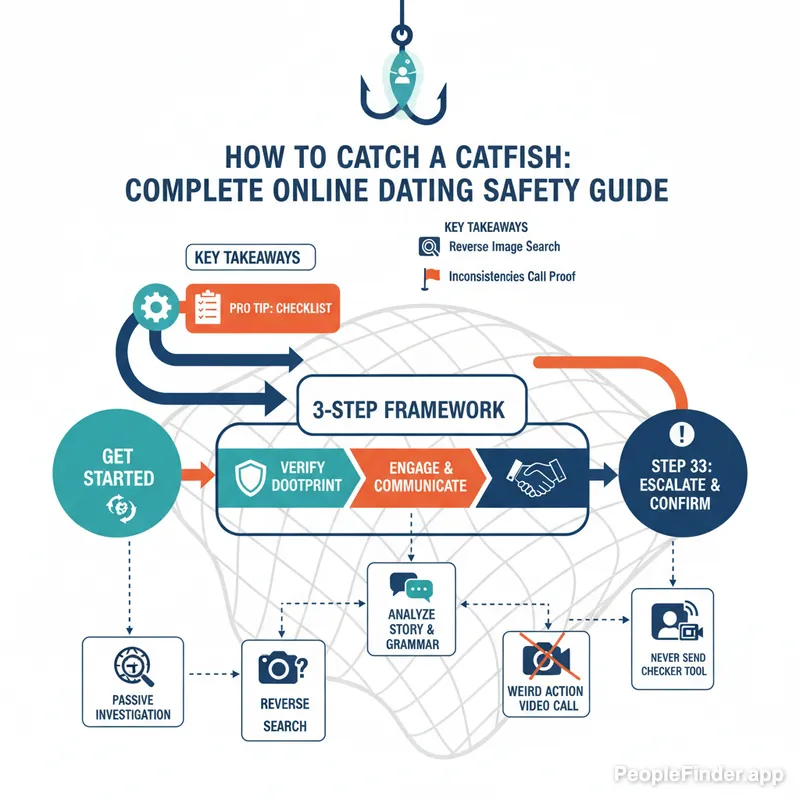
The 3-Step Catfish Detection Framework: Verify, Engage, Escalate
Randomly searching for clues can be overwhelming. Instead, I've found that a structured approach yields the best results. I call it the "Verify, Engage, Escalate" framework. It's a simple process that moves from low-confrontation digital snooping to a direct request for proof, ensuring you don't show your hand too early.
- Verify: Passively collect data using online tools without them knowing. This is your fact-finding phase.
- Engage: Use the information and inconsistencies you've found to ask targeted, subtle questions.
- Escalate: If you're still suspicious, raise the stakes by requesting definitive, real-time proof of identity.
This method helps you build a case methodically, so when you finally decide to trust them or cut them off, you're doing it based on evidence, not just a gut feeling.
Step 1: Verify Their Digital Footprint (The Passive Investigation)
This is where you do all the work behind the scenes. Your goal is to see if the digital breadcrumbs they've left behind match the story they're telling you. Your primary weapon here is a reverse image search.
Run a Reverse Image Search on All Their Photos
This is the most critical part of any catfish detection guide. A catfish almost always uses photos that aren't their own. A reverse image search scans the internet to find where else a photo appears.
How to do it:
- Go to the PeopleFinder Reverse Image Search tool.
- Upload the first photo you have of them.
- The tool will scan billions of images, social media profiles, and websites.
- Analyze the results. Are the photos linked to a social media profile with a completely different name? Do they appear on a stock photo website or in an old news article about someone else? This is your smoking gun.
[Visual Placeholder: Screenshot of the PeopleFinder.app image upload interface with an arrow pointing to the "Search" button.]
Repeat this process for every single photo they've given you. In my experience testing these tools, catfish often mix real (but stolen) photos with more generic ones. You might get a miss on one photo but a direct hit on another. Don't stop at one search. For a deeper dive, you can explore some of the other reverse image search engines, but a specialized people search tool often yields better results.
Scrutinize Their Social Media Profiles
If you find a social media profile, don't just take it at face value. Here's a contrarian insight: a "perfect" profile is often a bigger red flag than an empty one. Real people have messy, imperfect online lives.
- Check the Timeline: Is the profile brand new? Does it only have a few weeks or months of history? A real person's Facebook or Instagram profile usually goes back years.
- Analyze the Friends & Followers: Do they have a reasonable number of friends? Look at who comments on their photos. Are they all generic, bot-like comments ("Nice pic!") from other suspicious-looking profiles? Or are they real, tagged friends leaving inside jokes?
- Look for Tags: Real people get tagged in photos by their friends and family at events, dinners, and holidays. A catfish's profile will be a ghost town of photo tags. This is one of the hardest things for them to fake.
Step 2: Engage with Purpose (The Active Investigation)
Now that you have your background information, it's time to talk to them. But you're not going to accuse them of anything. You're going to engage them with questions designed to test their story.
Ask Specific, Verifiable Questions
Don't ask "How was your day?" Ask questions that have verifiable answers, especially related to their claimed location or job.
- Bad Question: "What do you like about living in Chicago?" (Anyone can google this.)
- Good Question: "The weather looks crazy there today! Are you near that big traffic jam on the I-90 they're showing on the news?" (This is specific, timely, and hard to fake without local knowledge.)
- Bad Question: "What do you do as an engineer?"
- Good Question: "Oh, you work at [Company Name]? My cousin's friend works there in the marketing department, maybe you know her? Her name is Sarah Smith." (Even if you're making it up, their reaction to a specific, plausible connection is very telling.)
Analyze Their Language and Story Consistency
Pay close attention to how they write. Many romance scam operations are run by teams in foreign countries. Look for odd phrasing, grammar that doesn't match their supposed education level, or a sudden shift in tone. If they claimed they grew up in Ohio but use British slang like "mate" or "cheers," that's a red flag. Refer back to your checklist of their life details. Do they forget something they told you last week? This is a common sign you need a reliable catfish checker. The details are hard for a scammer to keep straight.
Step 3: Escalate to Real-Time Proof (The Final Check)
If you've completed the first two steps and are still deeply suspicious, it's time to end the game. You need undeniable proof, and there's only one way to get it: a live video call.
The "Weird Action" Video Call Test
This is my favorite technique because it's so simple and effective. Most people who want to catch catfish online just ask for a video call. The scammer will have a dozen excuses: "My camera is broken," "The internet is bad here," "I'm too shy."
You need to bypass these excuses with a specific, slightly silly request. Don't just say, "Let's FaceTime." Say this:
"Hey, let's do a quick two-minute video call right now. I just want to see your smile! And just for fun, you have to hold up your car keys when you answer."
The request for a specific, random action (holding up keys, touching their nose, showing you their left shoe) is key. It's impossible to fake with a pre-recorded video loop or a deepfake. It requires them to be live, in the moment, and follow a command. Their refusal to do this simple, playful test is the only answer you need. There is no legitimate reason to say no.
Pro Tip: Trust Your Gut, But Verify It
Your intuition is a powerful tool. A 2024 Pew Research study found that 50% of online daters believe it is common for people to set up fake profiles. Your gut feeling that something is off is often right. But don't let it turn into paranoia. Use the verification steps in this guide to turn that feeling into hard evidence so you can make a clear-headed decision.
Comparison of Catfish Detection Methods
You have a few options for your investigation. Here’s how they stack up against each other.
| Method | Speed | Accuracy | What It Finds |
|---|---|---|---|
| PeopleFinder.app | Fast (minutes) | High | Connects photos to hidden social profiles, names, addresses, phone numbers, and more in one comprehensive report. |
| Google Reverse Image Search | Fast | Moderate | Finds exact photo matches across public websites. Less effective at finding social media profiles. Read our guide on finding people with photos online for more tips. |
| Manual Social Media Search | Slow (hours) | Low | Searching names on Facebook/Instagram. Often fails due to common names or private profiles. Can't verify photos. |
Troubleshooting Common Catfish Excuses
Catfish are master manipulators and have an excuse for everything. Here’s how to handle the most common ones.
- The Excuse: "My webcam/phone camera is broken."
Your Response: "No problem! We all have tech issues. Just borrow a friend's phone for two minutes. Or go to the library. I can wait. It's really important for me to see you." A legitimate person will find a way. A scammer will make another excuse. - The Excuse: "I don't have any social media. I'm a very private person."
Your Response: This is plausible but rare. It's also incredibly convenient for a scammer. Say, "I totally respect your privacy. That makes a quick video call even more important so we can confirm we're both real people." Their privacy shouldn't come at the expense of your safety. For a deeper look at scammer behavior, check out these common signs of a dating scammer. - The Excuse: "I'm overseas for work/in the military/on an oil rig."
Your Response: This is a classic catfish setup to explain poor communication and eventually ask for money. While many people do have these jobs, it's also the #1 lie used by scammers. Insist on a video call. Even on an oil rig, they have internet access for video calls. The FBI warns about this specific tactic.
Learning how to catch a catfish isn't about being cynical; it's about being smart and safe. By using a mix of technology like PeopleFinder and direct, clever communication, you can protect your heart and your wallet. Take control of your dating life and ensure the person you're falling for is real.
Ready to get the answers you deserve? Run your first search on PeopleFinder today and see what you uncover.
Frequently Asked Questions
What is the fastest way to spot a catfish?
The fastest way is to run a reverse image search on their profile pictures. Tools like PeopleFinder can instantly show you if those photos are associated with another name or have been stolen from a public profile, often providing a definitive answer in minutes.
Can you get in trouble for catfishing?
Yes, you can. While catfishing itself isn't a specific federal crime, the actions associated with it often are. If a catfish scams someone out of money, they can be charged with wire fraud. Some states also have specific laws against online impersonation for the purpose of harming or defrauding someone.
Why do people catfish others online?
Motivations vary widely. Many catfish are scammers seeking financial gain. Others may do it due to loneliness, low self-esteem, or a desire to explore a different identity. Some do it out of revenge or simply to cause chaos. The reason is often less important than identifying and stopping the deception.
What if a reverse image search doesn't find anything?
If a reverse image search comes up empty, it doesn't automatically mean they are legitimate. They could be using very obscure or private photos. In this case, move on to other verification steps, like analyzing their digital footprint, looking for inconsistencies in their stories, and insisting on a live video call.
How can I tell if a photo is photoshopped or a deepfake?
Look for subtle distortions. In photoshopped images, check for blurry edges around the person, odd lighting, or unnatural proportions. For video deepfakes, look for unnatural blinking patterns, strange skin texture, or a voice that doesn't perfectly sync with lip movements. However, a "weird action" video call is the best defense.
Is it safe to meet someone you suspect might be a catfish?
Absolutely not. If you have any serious doubts about someone's identity, do not agree to meet them in person, especially in a private location. Your safety is the top priority. Always verify their identity thoroughly online before even considering an in-person meeting in a very public place.
What should I do after I catch a catfish?
Once you've confirmed they are a catfish, cease all communication immediately. Block them on the dating app, social media, and on your phone. Report their profile to the platform where you met them to protect others. Do not engage them or tell them you know they're fake; just disappear.
Find Anyone Online in Seconds
Upload a photo and our AI finds matching profiles across the entire internet.
Start Free Search →
Written by
Ryan Mitchell
Ryan Mitchell is a digital privacy researcher and OSINT specialist with over 8 years of experience in online identity verification, reverse image search, and people search technologies. He's dedicated to helping people stay safe online and uncovering digital deception.
Recent Posts
- Social Catfish Alternatives That Actually Work in 2026
Sep 11, 2026
- Deleting Search History Made Easy and Private
Sep 8, 2026
- Image Similarity Search: How It Works and Why It Matters
Sep 4, 2026
- Online Reputation Monitoring: The 2026 Guide
Sep 1, 2026
- AI Face Search: How It Works and What to Know
Aug 28, 2026
You Might Also Like
- 9 Best Free Reverse Image Search Tools (2026 Updated)
Feb 24, 2026
- Free Reverse Image Search Tools That Actually Work
Feb 24, 2026
- Find Person by Photo: 8 Methods, Free Options and Limits
Feb 24, 2026
- How to Reverse Image Search on iPhone in 2026 (4 Methods)
Feb 23, 2026
- PimEyes vs FaceCheck: Which Face Search Wins in 2026?
Feb 24, 2026
Related Articles
9 Best Free Reverse Image Search Tools (2026 Updated)
Feb 24, 2026
Free Reverse Image Search Tools That Actually Work
Feb 24, 2026
Find Person by Photo: 8 Methods, Free Options and Limits
Feb 24, 2026
How to Reverse Image Search on iPhone in 2026 (4 Methods)
Feb 23, 2026
PimEyes vs FaceCheck: Which Face Search Wins in 2026?
Feb 24, 2026
Face Finder: 6 Best Tools to Identify Unknown Faces
Mar 2, 2026
Face Recognition Search: How AI Identifies People by Photo
Feb 27, 2026
What Is Reverse Image Search? Simple Explanation + Tools
Mar 9, 2026
10 Best Reverse Image Search Engines in 2026
Feb 23, 2026
7 Ways to Reverse Image Search on iPhone Like a Pro
Feb 20, 2026
How to Reverse Image Search on iPhone in 2026 (4 Methods)
Feb 23, 2026
How Reverse Image Search Works: A Complete Beginner's Guide
Feb 22, 2026
Stolen Photos Online? Find Them With Reverse Image Search
Feb 20, 2026
Reverse Image Search: The Ultimate Guide to Finding Anything Online 2026
Feb 22, 2026