Find Person by Photo: 8 Free Methods That Actually Work

Ever found a photo and wondered, "Who is this person?" Maybe you're trying to reconnect with an old friend, verify an online dating profile, or identify a person of interest in a historical image. Whatever your reason, the good news is you don't need to be a private investigator to get answers. You can often find a person by photo free using tools that are readily available online. This guide will walk you through eight distinct methods, from simple reverse image searches to more advanced forensic techniques, so you can finally put a name to a face.
Key Takeaways
- Reverse image search engines like Google Images, TinEye, and Yandex are the best starting point for any photo search.
- Don't just focus on the face; analyzing background details, clothing, and landmarks can provide critical clues.
- Hidden data within the photo file (EXIF data) can reveal the date, time, and even the exact GPS location where the picture was taken.
- Social media platforms are vast, searchable databases of faces, but you need the right technique to search them effectively.
- For difficult searches, combining results from multiple free tools is far more effective than relying on a single one.
- When free methods hit a wall, a dedicated service like PeopleFinder.app uses advanced technology to scan billions of records for a match.
What You'll Need Before You Start Your Search
Before you get started, make sure you have a few things ready. The better prepared you are, the higher your chances of success.
- The Highest Quality Photo Possible: A clear, well-lit, forward-facing image is ideal. If you only have a blurry or low-resolution copy, your results will be limited. Try to find the original source if you can.
- A Computer or Smartphone: Any device with a modern web browser will work for these methods.
- Any Known Details: Jot down anything you already know or suspect about the person—a possible first name, a city, a school, or a company. These details will help you narrow down the search results.
With these items in hand, you’re ready to begin. For a deeper understanding of the technology involved, check out our complete face-search guide.
Method 1: Harness the Power of Reverse Image Search Engines
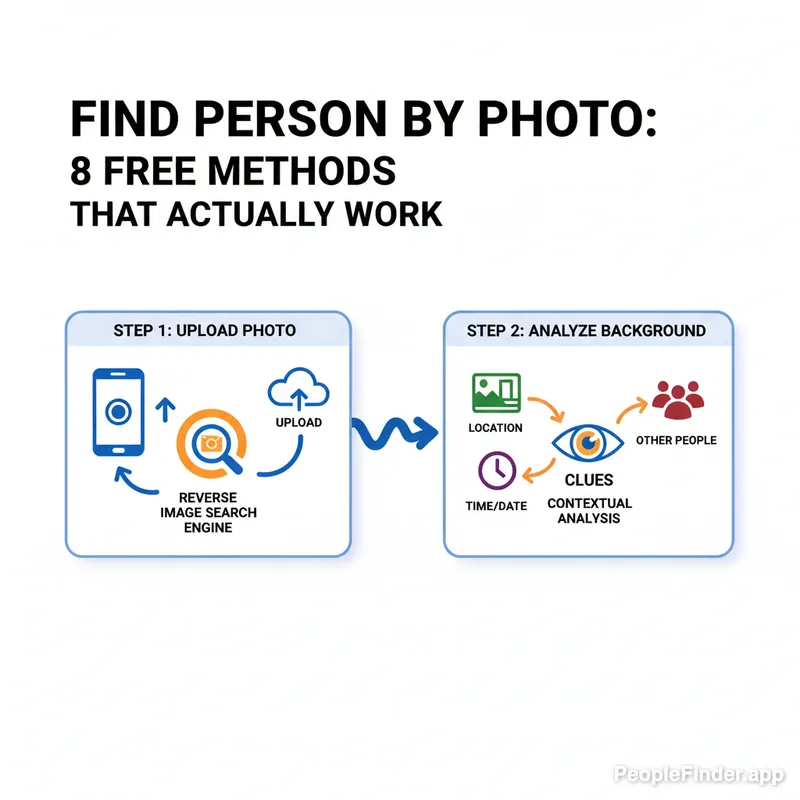
This is your first and most important step. Instead of searching with words, a reverse image search uses your photo as the query. These engines scan the web for visually similar images.
- Google Images: The most well-known option. Go to images.google.com, click the camera icon ("Search by image"), and upload your photo. Google will show you websites where that photo appears, plus a collection of visually similar images.
- TinEye: This engine is more specialized. TinEye is excellent for finding out where an image came from and if it has been modified. It's particularly useful for spotting fake profiles that use stock photos or pictures of celebrities.
- Yandex: A Russian search engine that, in my experience testing these tools, often has superior facial recognition capabilities compared to Google. If you're looking for a specific person, Yandex can sometimes find other photos of them even if the background and clothing are completely different.
[Visual Placeholder: Screenshot showing the "Search by image" camera icon on Google Images.]
Pro Tip: Crop and Isolate
If your photo has multiple people or a busy background, crop the image to focus only on the person's face before uploading it. This tells the search engine exactly what to look for and dramatically improves accuracy.
Method 2: Use Social Media to Find a Person by Picture
With over 70% of American adults on social media, according to a 2023 Pew Research Center report, platforms like Facebook, Instagram, and LinkedIn are massive, publicly accessible databases of photos. The trick is knowing how to search them.
- Facebook's "Photos of" Trick: If you have a potential name, you can use Facebook's graph search. Type "Photos of [Person's Name]" into the search bar. This can sometimes surface tagged photos that aren't visible on their main profile.
- Reverse Search and Add a Site Name: Run your image through Google Images, then add `site:facebook.com` or `site:linkedin.com` to the search query that Google generates. This filters the results to only show matches from that specific social network.
- Profile Picture Clues: Many people use the same profile picture across multiple platforms. If you find a match on Twitter, check for the same picture on LinkedIn or Instagram to gather more information. This is a key step in learning how to identify anyone from a photo.
Method 3: Extract Hidden Clues from EXIF Data
Here's a technique most people overlook. Almost every photo taken with a digital camera or smartphone contains hidden metadata called EXIF (Exchangeable Image File Format) data. This can be a goldmine of information.
I call this the Photo Forensics Framework—a simple, three-step process to uncover these hidden details:
- Extract: Upload your image to an online EXIF viewer like Jeffrey's EXIF Viewer. Don't download any software; a web-based tool is safer and faster. The tool will display all the embedded data.
- Analyze: Look for key data points. The most valuable are GPS coordinates (latitude and longitude), the date and time the photo was taken, and the camera/phone model used.
- Cross-Reference: This is where the magic happens. Paste the GPS coordinates into Google Maps to see the exact location. Was it taken near a specific university? A corporate headquarters? Search the date online to see if any local events happened that day. This context can crack the case wide open.
Contrarian Insight: This method won't work on photos downloaded from social media sites like Facebook or Instagram, as they strip out EXIF data to protect user privacy. It's most effective when you have the original file sent directly from a camera or phone.
Method 4: Identify People Through Objects and Landmarks
Here's my second contrarian take: stop focusing only on the face. The background of a photo often tells a bigger story. Google Lens (built into Google Photos and the Google app) is brilliant at identifying not just faces, but everything else in the picture.
- Scan for Landmarks: Is there a unique building, bridge, or statue in the background? Use Lens to identify it. Knowing the person was in Paris in front of the Eiffel Tower is a huge lead.
- Identify Logos and Uniforms: Does the person have a company logo on their shirt? A school mascot on their hat? Lens can often identify these and point you toward a specific employer or university.
- Analyze Products or Art: Is there a specific product, piece of art, or book in the photo? Identifying these can lead you to niche communities, reviews, or forums where the person might be active.
Method 5: Tap into Niche Online Communities and Forums
Sometimes, the best search engine is the collective brainpower of a dedicated community. If your photo is related to a specific hobby, event, or location, there's probably a forum or Reddit community full of experts who might recognize the person or the context.
- Reddit's /r/RBI (Reddit Bureau of Investigation): This subreddit is dedicated to solving mysteries, including identifying people from photos. Post your image (while respecting privacy and a person's potential desire not to be found) and provide any context you have.
- Hobbyist Forums: Is the person in the photo at a car show? A comic convention? A historical reenactment? Find the online forum for that specific event or hobby. Members there are often very knowledgeable and can identify people, locations, and dates with surprising accuracy.
Method 6: Check Public Records and Online Archives for a Match
This is a less common approach, but it can be very effective for older photos or pictures related to specific public events. If you have a potential name and location, you can sometimes find a matching photo in public databases.
- Newspaper Archives: Many local libraries and historical societies have digitized their newspaper archives. If you suspect the photo is from a news event, you might find it here.
- Yearbook Databases: Websites like Classmates.com have large collections of old yearbooks. If you know the person's approximate age and the high school or college they might have attended, this can be a great way to find a confirmed photo and name.
- Mugshot Websites: If your search is for safety or legal reasons, public arrest records and mugshot databases can be a source. Be aware that these sites are often riddled with ads and can be difficult to navigate.
Method 7: Try a Specialized Face Search Engine
While Google is a general-purpose tool, specialized people-finder engines like PimEyes are built exclusively for facial recognition. PimEyes uses advanced AI to scan the web for other photos containing the same face, even if they look different due to age, angle, or expression.
However, there's a catch. PimEyes is a powerful tool, but its results are often behind a paywall, and its use raises significant privacy questions. I've found that it's incredibly accurate for finding public photos on blogs, news sites, and forums, but it's not a tool for casual use. It's best reserved for serious investigations where other methods to find person by photo free have failed.
Comparison of Free Person-Finding Methods
| Method | Speed | Accuracy | Privacy Risk | Best For |
|---|---|---|---|---|
| Google Images | Very Fast | Moderate | Low | Finding exact photo matches and sources. |
| Yandex/TinEye | Fast | Moderate-High | Low | Finding modified images and different photos of the same person. |
| Social Media Search | Moderate | Varies | Moderate | Finding personal profiles and social connections. |
| EXIF Data | Fast | Very High (if available) | Low | Finding location and date from original photo files. |
| Online Forums | Slow | Varies | Moderate | Tapping into niche community knowledge. |
Method 8: Use a Professional People Finder for Guaranteed Results
The truth is, free methods have their limits. They rely on publicly indexed information, which can be incomplete, outdated, or just plain wrong. When you need a definitive answer and want to find people by photo quickly and accurately, a dedicated service like PeopleFinder.app is the most effective solution.
Instead of just scraping the public web, we use advanced facial recognition technology to scan billions of records from a wide range of sources, including:
- Publicly available social media profiles
- Data brokers and public records
- News articles, blogs, and marketing materials
- Vast online photo archives
This comprehensive approach provides a detailed report that doesn't just give you a name, but can also include contact information, known associates, location history, and more. It cuts through the noise and delivers actionable results when free tools leave you with more questions than answers.
Pro Tip: The Power of Combination
Don't use these methods in isolation. The best results come from combining them. Use Google Images to find a potential name, then use that name to search social media. Find a location from EXIF data, then search for people with that name in that city. Each piece of information is a key to unlock the next.
Troubleshooting Common Issues When You Find People by Photo
Sometimes your search to find a person by picture hits a snag. Here are a few common problems and how to solve them.
- The Photo is Too Blurry: Try using an AI-powered photo enhancement tool like Remini or Fotor to increase the resolution and clarity before you start your search. A sharper image can make all the difference.
- You Get "No Results Found": This likely means the image isn't publicly indexed online. This is where methods like EXIF data analysis or sharing it with a niche community can help. The person may exist online, but not using that specific photo.
- You Get Too Many Results: If you get thousands of "visually similar" images of different people, your photo is likely too generic. Go back and add more search terms. For example, search the image and add a suspected location or company name to the text query to narrow it down.
- You Suspect a Catfish or Scam: If you're verifying an online profile and the reverse image search points to a different person's profile, you're likely dealing with a scammer. The Federal Trade Commission (FTC) reported that romance scam losses exceeded $1.14 billion in 2023, often starting with a stolen photo. Trust the data and proceed with extreme caution. If free methods fail, running a search on PeopleFinder.app can provide the definitive proof you need.
Ultimately, while there are many ways to find person by photo free, they all require a bit of detective work. By using these methods strategically, you can uncover the story behind almost any photo. For those times when you need a fast, comprehensive, and certain answer, we're here to help.
Try PeopleFinder.app Now and Find Who You're Looking ForFrequently Asked Questions
Is it legal to search for a person using their photo?
Yes, it is generally legal to search for a person using a photo that is publicly available. The methods described here use publicly accessible information from search engines and social media. However, using someone's image for harassment, stalking, or commercial purposes without consent is illegal and unethical.
Can I find someone from a very old or black and white photo?
It's more difficult, but not impossible. Reverse image search may not work well, but you can focus on other methods. Analyze the background for historical clues, use AI colorization tools to bring out details, and share the photo on historical societies or genealogy forums where experts might recognize the time period, location, or even the individual.
What is the most accurate free reverse image search engine?
There isn't one "best" engine for every situation. Google Images is the best all-rounder for finding where an image appears online. Yandex often has more advanced facial recognition for finding different pictures of the same person. TinEye excels at tracking the origin of an image and spotting modifications. Using all three is the most effective strategy.
Why can't I find a person even if I have a clear photo?
This usually means the person has a very limited online presence or has strong privacy settings. The specific photo you have may not be publicly indexed anywhere online. In these cases, a professional service like PeopleFinder.app can be more effective as it accesses databases beyond what public search engines can see.
How can I protect my own photos from being found?
Set your social media profiles to private. Be mindful of what you post publicly. Use tools that automatically strip EXIF data before you upload photos. According to a 2023 Consumer Reports survey, over 70% of Americans are concerned about data privacy, so taking these steps is a wise precaution.
Can I find a person by photo on Facebook?
Directly uploading a photo to search on Facebook is not a feature. However, you can use a reverse image search on Google and add `site:facebook.com` to the search query it generates. This will filter results to show only matches found on Facebook profiles, pages, or groups.
What if the person in the photo is a minor?
You should exercise extreme caution and prioritize the child's safety and privacy above all else. If you have concerns about a child's welfare or safety based on a photo, do not post it publicly. Instead, contact the appropriate authorities, such as local law enforcement or the National Center for Missing & Exploited Children (NCMEC).
Find Anyone Online in Seconds
Upload a photo and our AI finds matching profiles across the entire internet.
Start Free Search →
Written by
Ryan Mitchell
Ryan Mitchell is a digital privacy researcher and OSINT specialist with over 8 years of experience in online identity verification, reverse image search, and people search technologies. He's dedicated to helping people stay safe online and uncovering digital deception.
Recent Posts
- Sherlock AI Face Search Reviews 2026: Better Options
Jul 31, 2026
- Reverse Image Search Mac: The Best Methods in 2026
Jul 30, 2026
- Account Takeover Prevention That Actually Works in 2026
Jul 29, 2026
- 10 Best OSINT Tools for Social Media (2026 Guide)
Jul 28, 2026
- How to Remove Metadata from Photos (2026 Guide)
Jul 27, 2026
You Might Also Like
- Find Someone Online: The Ultimate Guide to Reverse Image Search
Feb 19, 2026
- 5 Red Flags of a Dating Scam: Protect Yourself Now
Feb 20, 2026
- 10 Best Reverse Image Search Engines in 2026
Feb 23, 2026
- Search This Person: How to Identify Anyone from a Photo
Feb 24, 2026
- 7 Ways to Reverse Image Search on iPhone Like a Pro
Feb 20, 2026
Related Articles
Find Someone Online: The Ultimate Guide to Reverse Image Search
Feb 19, 2026
5 Red Flags of a Dating Scam: Protect Yourself Now
Feb 20, 2026
10 Best Reverse Image Search Engines in 2026
Feb 23, 2026
Search This Person: How to Identify Anyone from a Photo
Feb 24, 2026
7 Ways to Reverse Image Search on iPhone Like a Pro
Feb 20, 2026
How to Reverse Image Search on iPhone in 2026 (4 Methods)
Feb 23, 2026
How Reverse Image Search Works: A Complete Beginner's Guide
Feb 22, 2026
Stolen Photos Online? Find Them With Reverse Image Search
Feb 20, 2026
Reverse Image Search: The Ultimate Guide to Finding Anything Online 2026
Feb 22, 2026
Backwards Image Search: What It Is and How to Use It
Feb 24, 2026