Face Finder: 6 Best Tools to Identify Unknown Faces
You’ve got a photo of someone, but you have no idea who they are. Maybe it’s a potential date you want to verify, an old family photo with a mysterious relative, or a business contact you’re vetting. Whatever the reason, you need to put a name to a face. That’s where a powerful face finder online comes in. These tools use sophisticated AI to scan billions of images and data points, but not all of them are created equal. Many so-called "free" tools are just basic image search engines that fall flat when you need real identification.
The stakes can be high. In 2023 alone, reported losses from romance scams—a common reason people use these tools—hit a staggering $1.14 billion, according to the Federal Trade Commission. Using the right identify face tool isn't just about curiosity; it's about safety and peace of mind. I've spent hours testing dozens of platforms to separate the genuinely useful from the digital noise. Here’s the breakdown of the best tools that actually deliver results.
Key Takeaways
- Our #1 Pick is PeopleFinder.app: It combines powerful facial recognition with deep public records data for the most comprehensive results.
- Specialized Tools vs. General Search: True face finders like PeopleFinder and PimEyes use facial recognition, while tools like Google Lens and TinEye perform reverse image searches, which is a different technology for finding duplicate images.
- "Free" Isn't Always Free: Most genuinely effective tools require a subscription. Free options often provide limited, inaccurate, or surface-level information.
- Accuracy Varies: The quality of your source photo (lighting, angle, resolution) dramatically impacts the accuracy of any face finder online.
- Privacy is a Key Concern: Understand the privacy policies of any tool you use, as you are uploading personal data.
Quick Comparison of the Best Face Finder Tools
| Tool | Key Feature | Pricing | Best For |
|---|---|---|---|
| 1. PeopleFinder.app | Facial recognition + public records | Paid subscription | Comprehensive identity verification and background checks. |
| 2. PimEyes | Finds where a face appears online | Paid subscription | Tracking your own digital footprint or finding public sources of a photo. |
| 3. Social Catfish | Focus on catfishing & online scams | Paid subscription | Verifying online dating profiles and social media accounts. |
| 4. TinEye | Image source tracking | Free with paid API | Finding the origin of a photo, not identifying the person in it. |
| 5. Google Lens | Visual search for similar images | Free | Quick, surface-level searches and finding visually similar people. |
| 6. Betaface API | Face comparison & analysis | Free demo, paid API | Developers and tech-savvy users needing to compare two faces. |
1. PeopleFinder.app — The All-in-One Identity Solution
Let's get straight to it. For most people needing to identify an unknown face and get actionable information, PeopleFinder is the most powerful and complete solution. Here's why: it doesn't just find other pictures of a person. It connects that face to a real identity, pulling from a massive database of public records, social media profiles, and online data. This is the critical difference between just finding a photo and actually identifying a person. Our face search technology explained in our main guide shows how this goes beyond simple image matching.
You upload a photo, and the AI gets to work, creating a unique facial signature. It then cross-references this signature with billions of records to find a match. The final report can include full names, known aliases, age, location history, social media profiles, and even potential criminal records. This is the depth of information you need when you're trying to verify someone's identity for safety or due diligence.
- Pros:
- Combines facial recognition with deep background data.
- Provides comprehensive reports beyond just photos.
- High accuracy with clear, front-facing photos.
- User-friendly interface, easy for anyone to use.
- Cons:
- Requires a paid subscription for full reports.
- Results can be less accurate with low-quality or angled photos.
Key Features: Face recognition search, public records integration, social media profile discovery, location history, and potential criminal record flags. The platform also offers other search types like name, phone, and address lookups.
Pricing: Subscription-based, offering unlimited searches and reports.
Best For: Anyone needing a definitive answer about who a person is, from verifying an online date to identifying a person of interest in a business context.
2. PimEyes — The Digital Footprint Mapper
PimEyes operates on a different model that's incredibly powerful for a specific purpose: finding where a face appears publicly on the internet. You upload a photo, and it scours the open web—blogs, news sites, forums, public photo galleries—to find exact and similar-looking faces. It's less about telling you "this is Jane Doe" and more about showing you "this face appears on these 50 websites."
This makes it an excellent tool for managing your own online reputation or for journalists and researchers trying to trace the public appearances of an individual. In my experience testing these tools, PimEyes is lightning-fast at finding image sources. However, it comes with significant privacy considerations. Its ability to track faces across the web is unsettling to many, and the company has faced scrutiny for its potential misuse. You won't get a consolidated report with a name and address, but a list of URLs where the face was found.
- Pros:
- Extremely fast and effective at finding public photos online.
- Great for discovering where your own image is being used.
- Can search by uploading multiple photos to broaden the search.
- Cons:
- Does not identify the person or link to social media profiles directly.
- Subscription is expensive.
- Raises legitimate privacy concerns.
Key Features: Deep web search for faces, alerts for new sightings of a face, and tools to request image takedowns from third-party sites.
Pricing: Premium subscription model, with different tiers for features like alerts and deep searches.
Best For: Individuals managing their online presence, photographers tracking image theft, and researchers mapping a person's public digital footprint.
3. Social Catfish — The Online Dating Investigator
As its name suggests, Social Catfish is an identify face tool built specifically to combat online romance scams and catfishing. It functions similarly to PeopleFinder, combining image search with data lookups, but its marketing and feature set are laser-focused on the world of online dating and social media verification.
You can search by photo, name, email, phone number, or username. The platform is designed to help you verify if the person you're talking to on Tinder, Instagram, or Facebook is who they say they are. It's particularly good at finding social media profiles and dating site profiles associated with a photo. The user interface is straightforward, guiding you through the process of investigating a potential catfish. While it's very effective for its niche, it can be less comprehensive than PeopleFinder for general-purpose identity searches.
- Pros:
- Specialized for verifying online identities and detecting scammers.
- Searches a wide range of social media and dating sites.
- Offers multiple search methods beyond just a photo.
- Cons:
- Reports can be less detailed on non-social media data compared to PeopleFinder.
- Subscription can be pricey if you only need a one-time search.
Key Features: Reverse image search, username search, proprietary data on scammer profiles, and verification of social/dating profiles.
Pricing: Offers trial periods followed by a monthly subscription.
Best For: Anyone active in online dating or who suspects they are dealing with a catfish or online scammer.
4. TinEye — The Image Origin Detective
Here’s a contrarian take: TinEye is often listed as a face finder, but it's not. It’s a reverse image search engine, and a very good one, but its purpose is fundamentally different. TinEye specializes in finding out where an *image* came from and where it appears online. It uses image fingerprinting technology to find exact and modified copies of a picture, but it doesn't use facial recognition to identify the person *in* the picture.
So, why is it on this list? Because it's a crucial tool in the investigation process. If you upload a photo of a suspected scammer and TinEye finds it on a stock photo website or in a three-year-old news article about someone else, you've instantly debunked their story. I've found it's an essential first step for debunking fake profiles. Think of it as a fact-checker for images. It’s a great face finder free of charge for basic use, but it won’t give you a name.
- Pros:
- Excellent at finding the source and history of an image.
- Free for a generous number of searches.
- Can find cropped, edited, and resized versions of a photo.
- Cons:
- Does not perform facial recognition or identify people.
- Its index is smaller than Google's, so it may miss some sources.
Key Features: Image source tracking, comparison tool to see image modifications, and browser extensions for easy searching.
Pricing: Free for manual searches. Paid API for high-volume, automated use.
Best For: Fact-checkers, journalists, and anyone needing to find the original source of a picture to verify its authenticity.
5. Google Lens — The Universal Visual Search Tool
Google Lens (formerly Google Reverse Image Search) is the most accessible face finder online because it's built into Google and it's completely free. You can upload a photo, and Google's powerful engine will search for visually similar images across the entire web. It can be surprisingly effective at finding other photos of the same person, especially if they are a public figure or have a significant online presence.
However, its limitations are significant for serious identity searches. Google does not use true facial recognition to connect a face to a specific identity in its public search tool. Instead, it provides a "best guess" based on visual similarity. This means you’ll often get results for doppelgängers or people who simply look like the person in your photo. It’s a good starting point, but I would never rely on it for definitive identification. The sheer volume of online photos—a 2024 Pew Research study notes that 72% of U.S. adults have posted a photo of themselves—makes this a data-rich but noisy environment.
- Pros:
- Completely free and easy to use.
- Searches the largest database of images on the planet.
- Integrated into Chrome and Android for convenience.
- Cons:
- Not a true facial recognition tool; relies on visual similarity.
- Often returns results of people who just look similar.
- Lacks the detailed reports of specialized services.
Key Features: Visual search, object identification, text translation, and shopping links.
Pricing: Free.
Best For: Quick, casual searches, identifying public figures, or as a preliminary step before using a more powerful, paid tool.
6. Betaface API — The Developer's Choice
This one is for the tech-savvy crowd. Betaface isn't a consumer-facing search engine but a powerful API (Application Programming Interface) that offers a suite of facial recognition and analysis tools. You can upload a photo and get back detailed data, including facial landmarks, age and gender estimation, and more. Its most relevant feature is face comparison—you can upload two photos and get a similarity score to see if they are the same person.
While you can't just upload a photo and get a name, it's an incredibly useful tool for developers building their own face finder app or for users who need to perform a one-to-one comparison with high confidence. For example, if you have a photo and a potential match from another source, Betaface can help you confirm it with a numerical score. Their free demo on the website is a great way to see the technology in action without writing any code.
- Pros:
- Provides highly detailed facial analysis data.
- Excellent for comparing two faces to confirm a match.
- Free demo allows for testing and small-scale use.
- Cons:
- Not a search engine for finding unknown people.
- Requires technical knowledge to use the API effectively.
- The user interface is clinical and designed for developers.
Key Features: Face detection, facial landmark analysis, face comparison (1:1), and identity verification (1:N against your own database).
Pricing: Free demo for up to 500 images per day, with paid plans for API access.
Best For: Developers, researchers, and advanced users who need to compare faces or integrate facial recognition into their own applications.
Our Top Pick: For the vast majority of users who need to reliably identify a person from a photo and get comprehensive background information, PeopleFinder.app is the clear winner. It strikes the perfect balance between powerful, AI-driven facial recognition and the deep, actionable data from public records. While other tools are great for specific niches, PeopleFinder answers the fundamental question: "Who is this person?"
How We Tested These Face Finder Tools
To ensure a fair comparison, we developed a consistent testing methodology. I used a set of five test photos with varying quality: a clear, passport-style headshot; a candid photo with a slightly angled face; a blurry, low-resolution image from social media; a group photo where the target face was cropped out; and a black-and-white photo from a decade ago.
For each tool, I evaluated the following criteria:
- Accuracy: Did the tool find the correct person or provide relevant, accurate leads?
- Depth of Information: How much data did the report provide? Was it just a name, or did it include social profiles, location, contact info, etc.?
- User Experience: How easy was the tool to use? Was the interface intuitive and were the results easy to understand?
- Speed: How long did it take to get results?
This process allowed us to see how each face finder online performed under different conditions and to understand their true strengths and weaknesses beyond their marketing claims. We also considered the ethical implications and privacy policies of each service.
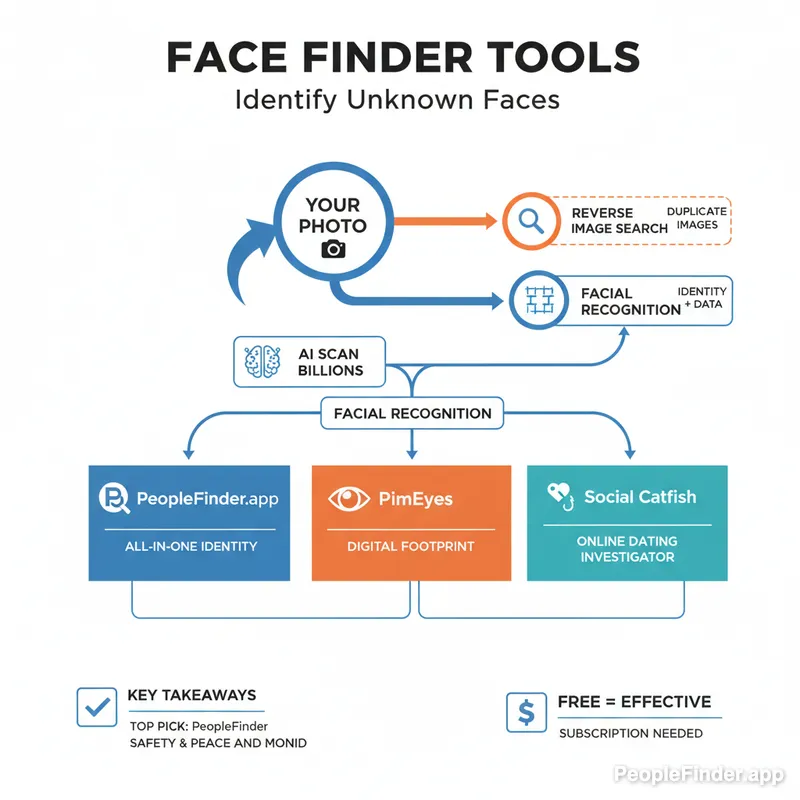
Infographic: A visual flowchart showing the "3-C Verification Method" - starting with uploading a photo to a tool like PeopleFinder (Cross-reference), then checking results against social media like LinkedIn (Contextualize), and finally verifying with another data point (Confirm).
Another expert tip: don't just rely on the tool. Use what I call the "3-C Verification Method." First, Cross-reference the initial results from a tool like PeopleFinder. If it gives you a name, search that name on other platforms. Second, Contextualize the findings. Does the location, age, and professional history found on LinkedIn match the person you think it is? Third, Confirm with a piece of information you already know, if possible. This disciplined approach, which we detail in our guide to how AI identifies people by photo, turns a simple search into a reliable investigation.
Ultimately, identifying an unknown person requires the right technology and a smart strategy. Start with the best tool for the job, and you'll be on the fastest path to the truth. Ready to put a name to that face? Start your PeopleFinder search today.
Frequently Asked Questions
Is it legal to use a face finder online to identify someone?
Yes, it is generally legal to use these tools to search for information derived from publicly available data. These services compile information from public records, social media, and other open sources. However, how you use that information is subject to laws like the Fair Credit Reporting Act (FCRA), which prohibits using this data for decisions about employment, credit, or housing.
How accurate are facial recognition searches?
Accuracy depends heavily on the tool's algorithm and the quality of your photo. A clear, well-lit, front-facing photo can yield accuracy rates above 99% with top-tier services. Results degrade with poor lighting, extreme angles, obstructions (like sunglasses), and low resolution. Always treat the initial results as a strong lead to be verified.
Can I find someone from a very old photo?
It's possible, but challenging. Modern AI can account for aging to some extent, but significant changes over decades can make it difficult. Success depends on the quality of the old photo and whether the person has a recent digital footprint for the AI to match against. Enhancing the old photo with a photo restoration tool first can sometimes improve your chances.
What is the best free face finder?
Google Lens is the best and most widely available free tool. However, it's a reverse image search engine, not a true facial recognition service. It finds visually similar images, which may or may not be the same person. For genuine identification, a dedicated, paid service like PeopleFinder.app is significantly more reliable.
Can these tools find people who are not on social media?
Yes. Premium tools like PeopleFinder.app don't just rely on social media. They access vast databases of public records, including property records, voter registration files, court records, and more. This allows them to identify individuals who have a minimal or non-existent social media presence.
How can I remove my photo from a face finder's database?
Most reputable services have an opt-out or data removal process. You typically need to visit their privacy policy page and follow the instructions, which may involve filling out a form and verifying your identity. For tools like PimEyes that search the open web, you would need to contact the source website where the image is hosted to request its removal.
Does a face finder app work with video?
Most face finder apps require a static image, not a video file. The best technique is to play the video, pause on the clearest possible frame of the person's face, and take a high-resolution screenshot. You can then upload this screenshot to the face finder tool for the best results.
Find Anyone Online in Seconds
Upload a photo and our AI finds matching profiles across the entire internet.
Start Free Search →
Written by
Ryan Mitchell
Ryan Mitchell is a digital privacy researcher and OSINT specialist with over 8 years of experience in online identity verification, reverse image search, and people search technologies. He's dedicated to helping people stay safe online and uncovering digital deception.
Recent Posts
- Social Catfish Alternatives That Actually Work in 2026
Sep 11, 2026
- Deleting Search History Made Easy and Private
Sep 8, 2026
- Image Similarity Search: How It Works and Why It Matters
Sep 4, 2026
- Online Reputation Monitoring: The 2026 Guide
Sep 1, 2026
- AI Face Search: How It Works and What to Know
Aug 28, 2026
You Might Also Like
- 10 Best Reverse Image Search Engines in 2026
Feb 23, 2026
- 9 Best Free Reverse Image Search Tools (2026 Updated)
Feb 24, 2026
- Free Reverse Image Search Tools That Actually Work
Feb 24, 2026
- Find Person by Photo: 8 Methods, Free Options and Limits
Feb 24, 2026
- How to Reverse Image Search on iPhone in 2026 (4 Methods)
Feb 23, 2026
Related Articles
10 Best Reverse Image Search Engines in 2026
Feb 23, 2026
9 Best Free Reverse Image Search Tools (2026 Updated)
Feb 24, 2026
Free Reverse Image Search Tools That Actually Work
Feb 24, 2026
Find Person by Photo: 8 Methods, Free Options and Limits
Feb 24, 2026
How to Reverse Image Search on iPhone in 2026 (4 Methods)
Feb 23, 2026
PimEyes vs FaceCheck: Which Face Search Wins in 2026?
Feb 24, 2026
Reverse Image Search: The Ultimate Guide to Finding Anything Online 2026
Feb 22, 2026
Face Recognition Search: How AI Identifies People by Photo
Feb 27, 2026
7 Ways to Reverse Image Search on iPhone Like a Pro
Feb 20, 2026
How Reverse Image Search Works: A Complete Beginner's Guide
Feb 22, 2026
Stolen Photos Online? Find Them With Reverse Image Search
Feb 20, 2026