10 Best Reverse Image Search Engines in 2026

Ever swiped right on a dating profile that seemed just a little too perfect? Or maybe you’ve seen a product on social media and wondered where to actually buy it. You have a picture, but no context. That's where you need to go beyond a simple text query and use one of the best reverse image search engines available today. These powerful tools let you search with an image instead of words, unlocking a wealth of information you’d otherwise miss.
But here's the thing most guides won't tell you: not all image search tools are created equal. Using Google for everything is a rookie mistake, especially when you're trying to find information about a person. We're heading into 2026, and the technology has evolved. You need the right tool for the right job, whether that's verifying an identity, finding the source of a photo, or protecting your own images from misuse.
Key Takeaways
- General engines like Google and Bing are great for objects and places, but often fail when identifying specific people or unindexed social media profiles.
- Specialized reverse image search engines like PeopleFinder.app are far more effective for verifying identities, uncovering social profiles, and getting the full story behind a photo of a person.
- For maximum success, use a multi-engine strategy. Start broad with a tool like Yandex, then narrow your focus with a specialized platform depending on your goal.
- Privacy is a major differentiator. Tools like DuckDuckGo offer anonymity, while platforms like PeopleFinder conduct searches privately without notifying the subject.
- The most advanced tools now use sophisticated AI to find visually similar images, not just exact copies, which is crucial for spotting catfish who slightly alter photos.
What Makes a Reverse Image Search Engine "Best" in 2026?
Before we list the top tools, you need a framework for evaluating them. In my experience testing dozens of these platforms, I've found that the "best" engine depends entirely on your goal. Don't just default to the one you know. Instead, judge them on these four critical factors:
- Indexing & Database Size: How much of the internet can it "see"? Google's index is massive for public websites, but it's blind to many private social media profiles, forum avatars, and fragmented data. A specialized people search engine, like PeopleFinder.app, taps into different data sources that general search engines can't access.
- AI Matching Algorithm: Is it just looking for an exact copy? Or can it identify the subject, objects, and context within the photo? Modern engines use AI to find visually similar images, different crops of the same photo, and even a person at different ages. This is the secret sauce.
- Privacy Policy: What happens to the image you upload? Does the engine store it? Does it connect the search to your personal account? This is a huge deal. A search to verify a potential date shouldn't end up with your photo stored on a server indefinitely.
- Specialization: Is the tool a jack-of-all-trades or a master of one? A reverse picture search engine built to identify products will have a different algorithm than one built to find people or one designed for artists to find stolen work.
A Closer Look at the Top General-Purpose Image Search Engines
These are the household names. They're fast, free, and great for quick, non-sensitive searches. Think of them as your first-pass tool.
1. Google Lens (Formerly Google Images)
You know it, you've probably used it. Google Lens is built into the Chrome browser and Android phones, making it incredibly accessible. It’s excellent at identifying landmarks, plants, products, and text within images. Where it falls short is with people. It often struggles to identify a non-famous person and will instead show you pictures of people who look vaguely similar. It's a decent starting point, but rarely the endpoint for a serious investigation.
2. Bing Visual Search
Don't sleep on Bing. Microsoft's visual search is surprisingly powerful, especially for e-commerce. It's often better than Google at identifying a specific product within a larger photo and showing you where to buy it. Its "Visual Search" feature lets you crop a section of an image to search, which is a fantastic tool for isolating one person in a group photo before taking it to a more specialized engine.
3. Yandex
Here’s an opinion you won't see everywhere: for finding faces and visually similar images, Yandex is frequently better than Google. The Russian search giant uses a different algorithm that seems to be more focused on facial and object geometry. I've found that when Google returns a page of "similar-looking stock photos," Yandex often finds other social media profiles or websites where the *exact* same person appears, even in different photos. It's a must-try if your first search on Google or Bing fails.
4. DuckDuckGo
If privacy is your main concern for a general search, DuckDuckGo is your go-to. It doesn't track your searches or store your images. The trade-off? Its image search results are primarily powered by Bing. So you're getting Bing's power with a layer of privacy on top, which is a solid combination. But you won't get unique results you couldn't find elsewhere.
Pro Tip: When searching for a person, always crop the image to show only their face. Including busy backgrounds, other people, or even distracting clothing patterns can confuse the algorithms of general image search engines and pollute your results.
Why Specialized Reverse Photo Search Engines Outperform the Giants
The rise of online dating, remote work, and e-commerce has created a massive need for verification. General search engines just aren't built for it. They're designed to catalog the public web, not to connect the dots on a person's digital footprint. A 2023 Pew Research study found that about half of online daters believe it's common for people to set up dishonest profiles. This is where specialized tools shine.
5. PeopleFinder.app (Best for People Searches)
When your search is about a person, you need a people-finder. PeopleFinder.app is designed for this specific task. Instead of just matching pixels, it uses advanced facial recognition and connects the image to a vast database of public records, social media profiles, and other online data. You don't just find other places the photo appears; you can find the person's name, potential location, other social media accounts (even ones with different photos), and more. It's the difference between asking "Where has this photo been?" and "Who is this person?"
6. TinEye
TinEye is one of the oldest and most respected reverse image search engines. It's not great for finding people, but it's the absolute best for tracking the source and spread of an image. It crawls the web and keeps a running history of where and when an image appeared. This is invaluable for photographers, artists, and journalists who need to find out if their work has been stolen or to trace a meme back to its origin. It has a massive index of over 68 billion images.
7. PimEyes
PimEyes is a powerful but controversial facial recognition search engine. It's incredibly adept at finding a person's face across the internet. However, its business model and the ethical implications of its power have drawn criticism. It's a subscription-based service and can be quite expensive. While its technology is impressive, it's a tool to be used with caution and awareness of its potential for misuse.
Niche and Specific-Use Reverse Picture Search Engines Worth Knowing
Sometimes you need a very specific tool. These last three are masters of their niche.
8. Social Catfish
As the name implies, Social Catfish is focused on verifying online identities to uncover scammers and catfish. It combines a reverse image search with searches for names, email addresses, and phone numbers. It's a strong tool for online dating safety, though its reports can sometimes be less comprehensive than a dedicated people search platform.
9. Berify
Berify is another tool built for creators. It helps photographers and brands find stolen images and videos. It automates the process of reverse image searching across Google, Bing, and other engines, and then presents the results in a clean dashboard, making it easier to track down copyright infringement.
10. SauceNAO
If you're in the world of anime, manga, or digital art, SauceNAO is your best friend. It's a reverse photo search engine specifically for finding the source of art. It can identify the artist, the character, and the series with incredible accuracy, pulling from databases like Pixiv, Danbooru, and others that general engines often miss.
Pro Tip: Browser extensions can make reverse image searching much faster. Tools like "Search by Image" let you right-click any image on any website and instantly search it with multiple engines (Google, Bing, Yandex, TinEye) without having to save and re-upload the file.
Comparison of Top Reverse Image Search Engines
| Tool | Best For | Privacy Focus | Accuracy (People) | Cost |
|---|---|---|---|---|
| PeopleFinder.app | Identifying people, verifying online profiles, finding social media accounts. | High (Private, secure searches) | Excellent | Paid (with trial) |
| Google Lens | Objects, products, landmarks, general information. | Low (Tied to your Google account) | Poor to Fair | Free |
| TinEye | Tracking image origins, finding copyright infringement. | Moderate (Has a clear privacy policy) | Poor | Free (with paid API) |
| Yandex | Finding visually similar images and alternate photos of the same person. | Low | Good | Free |
How to Maximize Your Search Success with the "Image Triangulation" Method
Here’s the expert strategy that will give you the best possible results. The biggest mistake is running one search on one engine and giving up. The pros use a multi-step process I call "Image Triangulation" to zero in on the truth.
- Start with a Broad, Technical Search. Don't start with Google. Start with Yandex or TinEye. Your goal here isn't to identify the person, but to find other instances of the *exact* same image file online. This can instantly reveal if a photo was stolen from someone else's public social media profile or a stock photo website. It's a quick technical check for authenticity.
- Run a General Context Search. Now, take your image to Google Lens or Bing Visual Search. This will help you identify any products, locations, or recognizable logos in the background. Is the person standing in front of a landmark you can identify? Are they wearing a t-shirt from a specific local event? This step adds valuable context.
- Execute a Specialized People Search. This is the most important step. Once you've confirmed the image isn't a common stock photo, it's time to find out who the person is. Upload the photo to a dedicated reverse photo search engine for people, like PeopleFinder.app. This is where you'll connect the image to a name, social media profiles, and other identifying information. This is how you go from a picture to a person. You can learn more about the specifics of finding someone with just a photo in our detailed guide.
- Verify and Cross-Reference. Compare the information from PeopleFinder with the context you gathered in step 2. Do the social media profiles match the name? Does the location mentioned align with the landmarks in the photo? This final step confirms your findings and protects you from being misled.
This systematic approach is how you get real answers and avoid the pitfalls of online deception. Unfortunately, this is more necessary than ever. The Federal Trade Commission reported that consumers lost a shocking $1.14 billion to romance scams in 2023 alone, often involving fake profiles and stolen photos.
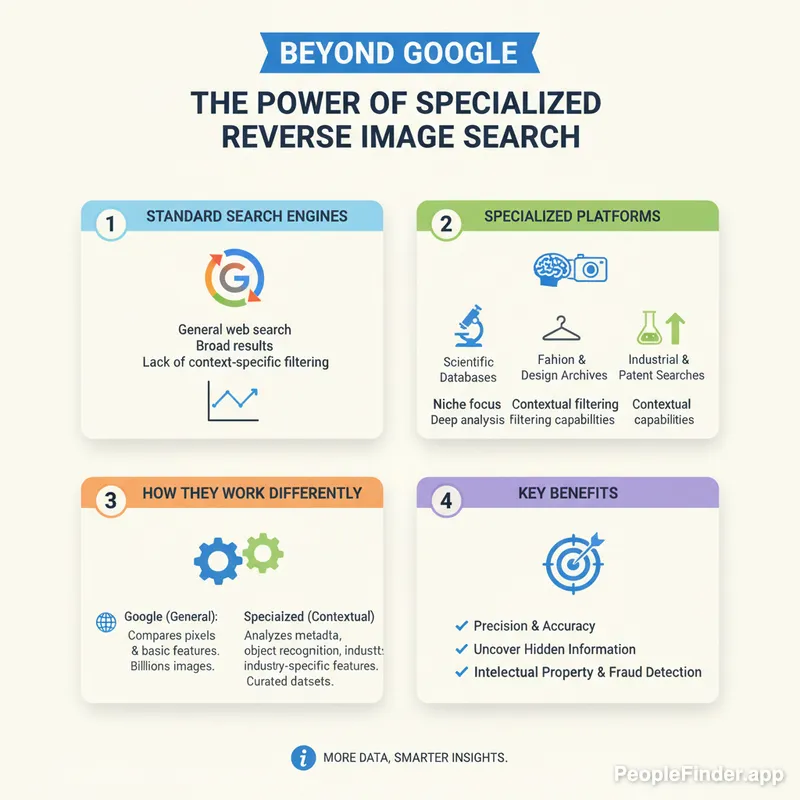
Using the right tools isn't just about curiosity; it's about safety. Whether you're a freelancer checking a new client, an online dater verifying a match, or just trying to find the source of a viral image, the right reverse image search engines are essential. While general tools have their place, the future is specialized. For any search involving a person, a dedicated platform like PeopleFinder will give you the clarity and peace of mind you need. Ready to stop guessing? Start Your Search and get the real story behind the picture.
Knowing how to perform these searches on the go is also crucial. The techniques can vary slightly by device, so it's helpful to understand the process for how to reverse image search on an iPhone. And if your gut is telling you something is off with an online dating match, be sure to check for these common signs of a dating scammer.
Frequently Asked Questions
What is the most accurate reverse image search engine?
The most accurate engine depends on the query. For identifying products and general objects, Google Lens is highly accurate. For tracking the original source of an image, TinEye is unmatched. For accurately identifying a person and finding their associated online profiles, a specialized service like PeopleFinder.app is the most accurate and effective choice.
Can I find a person with just a picture?
Yes, absolutely. Using a reverse photo search engine designed for finding people, you can upload a picture and uncover their identity, social media profiles, and other public information. General engines like Google may only show visually similar faces, but specialized tools connect the photo to real-world data.
Is it legal to use a reverse picture search engine?
Yes, it is legal to use reverse image search engines. These tools crawl and index publicly available information from the internet. Using them to find the source of an image or identify a person based on a photo you possess is not against the law. However, how you use that information is subject to laws regarding privacy, stalking, and harassment.
Does Google keep the images I search with?
Yes, when you are logged into a Google account, your search history, including images you've uploaded, can be saved to your account. According to Google's privacy policy, they may use this data to improve their services. If you are concerned about privacy, use an engine like DuckDuckGo or a private service.
How can I reverse image search a screenshot?
You can reverse image search a screenshot the same way you would any other image. Simply take the screenshot on your device, save it, and then upload the saved file to your chosen reverse image search engine. For best results, crop the screenshot to include only the relevant part of the image you want to search.
What is the best reverse image search for mobile phones?
For mobile, Google Lens is deeply integrated into Android and the Google App on iOS, making it the most convenient option for general searches. However, for people-focused searches, using the mobile website of a service like PeopleFinder.app in your phone's browser will yield far better and more detailed results.
Can a reverse image search detect a catfish?
Yes, it's one of the most effective methods for detecting a catfish. Scammers often use photos of other people (like models or influencers) that are widely available online. Running their profile picture through multiple reverse image search engines can quickly reveal if the photo is associated with a different name or appears on stock photo sites, exposing the fake profile.
Find Anyone Online in Seconds
Upload a photo and our AI finds matching profiles across the entire internet.
Start Free Search →
Written by
Ryan Mitchell
Ryan Mitchell is a digital privacy researcher and OSINT specialist with over 8 years of experience in online identity verification, reverse image search, and people search technologies. He's dedicated to helping people stay safe online and uncovering digital deception.
Recent Posts
- Social Catfish Alternatives That Actually Work in 2026
Sep 11, 2026
- Deleting Search History Made Easy and Private
Sep 8, 2026
- Image Similarity Search: How It Works and Why It Matters
Sep 4, 2026
- Online Reputation Monitoring: The 2026 Guide
Sep 1, 2026
- AI Face Search: How It Works and What to Know
Aug 28, 2026